
Manage Rhino Viewport in Grasshopper
This simple vb.net component controls the Rhino viewport background without a need to enter its options panel. It is used to change the viewport background color and grid visibility quickly within Grasshopper. Here is the definition file: [GHX: 0.9.0056]. In order to be able to return to default settings, I put a “default” toggle. Just click on it to “false” state, then the Rhino background color can be changed by the B input. This component also handles the grid. However I couldn’t find a working method to hide and show the Rhino grid within Grasshopper, so I tweaked that effect by changing the grid colors to be the same as the background color. However, if your return to “true” in default input, the grid also returns to Rhino’s default colors.
If D = True Then
	Rhino.ApplicationSettings.AppearanceSettings.ViewportBackgroundColor = Color.FromArgb(0, 157, 163, 170)
Else
	Rhino.ApplicationSettings.AppearanceSettings.ViewportBackgroundColor = B
End If
If G = False And D = False Then
	Rhino.ApplicationSettings.AppearanceSettings.GridThickLineColor = B
	Rhino.ApplicationSettings.AppearanceSettings.GridThinLineColor = B
	Rhino.ApplicationSettings.AppearanceSettings.GridXAxisLineColor = B
	Rhino.ApplicationSettings.AppearanceSettings.GridYAxisLineColor = B
	Rhino.ApplicationSettings.AppearanceSettings.GridZAxisLineColor = B
Else If G = False And D = True Then
	Rhino.ApplicationSettings.AppearanceSettings.GridThickLineColor = Color.FromArgb(0, 157, 163, 170)
	Rhino.ApplicationSettings.AppearanceSettings.GridThinLineColor = Color.FromArgb(0, 157, 163, 170)
	Rhino.ApplicationSettings.AppearanceSettings.GridXAxisLineColor = Color.FromArgb(0, 157, 163, 170)
	Rhino.ApplicationSettings.AppearanceSettings.GridYAxisLineColor = Color.FromArgb(0, 157, 163, 170)
	Rhino.ApplicationSettings.AppearanceSettings.GridZAxisLineColor = Color.FromArgb(0, 157, 163, 170)
Else
	Rhino.ApplicationSettings.AppearanceSettings.GridThickLineColor = Color.FromArgb(0, 129, 134, 140)
	Rhino.ApplicationSettings.AppearanceSettings.GridThinLineColor = Color.FromArgb(0, 147, 153, 160)
	Rhino.ApplicationSettings.AppearanceSettings.GridXAxisLineColor = Color.FromArgb(0, 150, 75, 75)
	Rhino.ApplicationSettings.AppearanceSettings.GridYAxisLineColor = Color.FromArgb(0, 75, 150, 75)
	Rhino.ApplicationSettings.AppearanceSettings.GridZAxisLineColor = Color.FromArgb(0, 75, 75, 150)
End If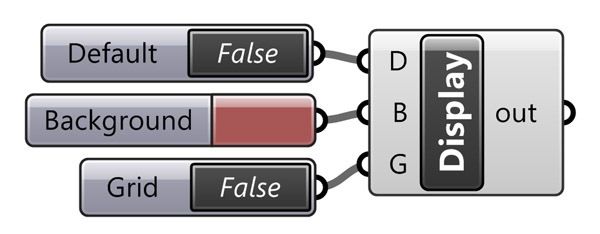
This can be handy for example if you are working on a display installation, using Firefly.
Cite this post
Related Posts
Rhino Viewport Colors
August 8, 2023
Recently I found this VB.net component in an old Grasshopper project. I am not sure if it is mine or not, but I wanted to share it with you. This code modifies Rhino viewport colors quickly without entering the Rhino options window. I frequently modify the viewport colors and grid settings to create renders or animations within Grasshopper. This is why, this component might be useful in making quick modifications to the screen colors. Here is the VB.net code inside…
Aligned Text in Grasshopper
January 7, 2014
Currently, Rhinoceros does not offer the capability for an aligned text onto a curve, to the best of my knowledge. However, Grasshopper, with its latest version, provides a solution for such tasks by offering a range of text components. For my current project, I am studying an installation. It incorporates various typographic effects, and Grasshopper has become an invaluable tool in this regard. Nevertheless, it is important to note that Grasshopper’s native text components do not yet include a comprehensive…
Subdivide by Image Contrast
October 17, 2012
This was my old plan to work with images in Grasshopper. Certainly, that was not the result I expected, but this could be counted as a starting point. After seeing beautiful circle packing compositions here, I decided to program Grasshopper, so that it’ll create a subdivision, based on image data. This was the initial version, just subdividing a plane with Voronoi points and visualizing it according to the image’s color values of proper UV coordinates. There is no interpretation on…
Parametric Muqarnas
March 13, 2012
This was an interesting topic in design computing class. Geometric constructions based on strict relationships are becoming exciting in parametric modeling environments. I think muqarnas includes such a relationship. There is a primary method of modeling this shape, introduced by Mete Tüneri. His solution to a simple parametric muqarnas object includes a surface with six reference points, with two boolean differences (one cylinder and one box) creating the component. In Grasshopper, I tried to simulate his process by adding real-time…
Rhinoceros Layout Tutorial
December 14, 2024
In Rhino, layouts are used to prepare drawings for printing or presentation. They provide a way to organize and display 2D views of your 3D model, such as top, front, side, and perspective views, in a way suitable for producing printed or published documents. In this short tutorial video, I show the basic usage of the Rhinoceros layout system. So, this Rhinoceros Layout Tutorial video is for beginner-level CAD users. Therefore, you can use it to create PDF posters and…