
Map Cleaner Script
The dwg format maps in Turkey are often problematic. You need to clean these for architectural studios. Maps mostly contain height information of buildings. But the contours of the buildings are distorted and polylines are generally exploded. The map of the region where we worked in the studio I conducted in the Fall 2021 term was also problematic. I created a Map Cleaner Script in Rhino Python and converted the building drawings on the map into solid 3D models.
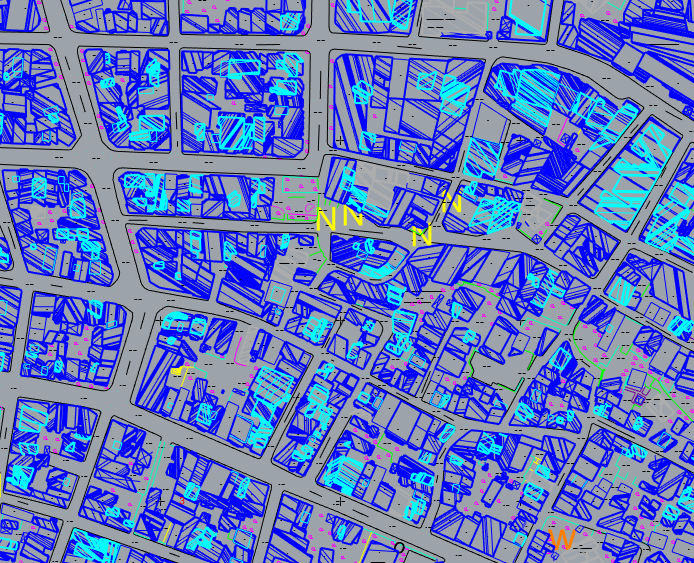

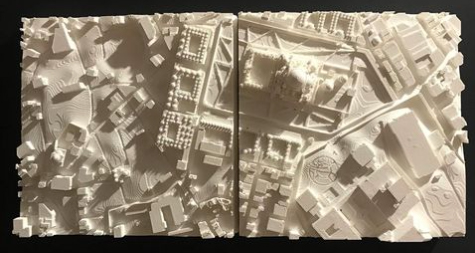
We then used this Map Cleaner Script to create a model for 3D printing the terrain. There was no way to manually create hundreds of building blocks one by one. That’s why the Python script worked very well. I don’t know if this script will work in your case. The version of the meshoutline command in the Rhinoscriptsyntax module has some errors. Therefore I called this command with Rhino.command. And it works miraculously. You can see the video I took while working on the Instagram post below. The top view must be active while the script is running and you must select only the building lines after running the script.
# Convert mesh to polysurface buildings in 3d
import rhinoscriptsyntax as rs
objects = rs.GetObjects()
for object in objects:
	if rs.ObjectType(object) == 32: # is mesh
#		f = rs.MeshOutline(r, "Top") is problematic.
		rs.SelectObject(object)
		rs.Command("MeshOutline") # you must be in top view!
		results = rs.SelectedObjects()
		h = rs.MeshAreaCentroid(object)
		for result in results:
			surface = rs.ExtrudeCurveStraight(result, [h[0],h[1],0], h)
			rs.CapPlanarHoles(surface)
			rs.ObjectLayer(surface, "New")
			rs.DeleteObject(result)
		rs.DeleteObject(object)
In this simple example, I chose Python over Grasshopper. Both languages have their advantages. The reason I chose Python is to not forget this language and to show that it is still usable. Indeed, although Rhino Python seems like a dead language because the module cannot be loaded, it can be very useful sometimes.
Cite this post
Related Posts
Flow Map on Terrains
September 11, 2026
We previously looked at the terrain generator script we used in midterm projects with first-year architecture students over here. Later on, we added a few analysis modules to this tool. You might remember the slope analysis tool from this link. Today’s topic is another type of analysis: flow. The idea for this code wasn’t actually mine; I developed it by looking at an existing script based on Serkan Uysal’s suggestion. Unfortunately, I don’t know who originally wrote it. Keeping track…
Curvature Map on Terrains
September 17, 2026
This is the last of the site analysis tools we previously used in the midterm project of first-year architecture education. As you may recall, we previously introduced a tool that generates topographies based on specific parameters. Afterward, we examined two tools that perform slope and flow analyses on these topographies. Today, we are presenting a tool that analyzes curvature. This topic actually constitutes one of the interesting intersection points between architectural design and differential geometry. Curvature is not something architects…
Slope Map on Terrains
August 18, 2026
I previously shared the Grasshopper definition for terrain generation that we used in last year’s studio midterm. One of the goals of this project was to take the first step toward developing students’ skills in understanding, processing, and utilizing terrain data as a design input. To support this objective, we provided them with small supplementary tools. One of these tools was the slope map. As you can see, this is quite a simple Grasshopper definition. It computes the slope of…
Terrain Generator
August 13, 2026
Last year, for the midterm assignment in our first-year basic design studio, we gave our students a range of different, randomly generated contexts to work with. For this purpose, I developed a small Grasshopper tool that makes the graph of a function look as much like a terrain model as possible. This tool is not really a procedural terrain generator. I would genuinely like to build one, someday. What we have here is simply a function surface. At the inputs,…
Terrain Modeling
July 19, 2023
Here is a short tutorial on getting help from Grasshopper in physical terrain modeling. It is a classical architectural terrain modeling process. Let’s see how Grasshopper can help us with this. Part 1: Terrain modeling for Laser cutter The terrain model entered in the Brep data store in this application is a closed/solid model. For now, you can also use ready-made components such as Cone or Sphere (Sph) to quickly produce a solid model. In this application, after we obtained…