
Design Mathematics Student Work: Pi Chapel
Today, I am introducing a student work from the Design Mathematics course. Foad Sarsangi is a very talented designer, who attended my elective course last semester. The final project he studied was inspired by Peter Zumthor’s Bruder Klaus chapel. Foad wanted to experience its special production process. However, as the course was about “mathematics”, he also studied, solved, and generated an interior volume to be subtracted from a solid mass. Here are the project documents:
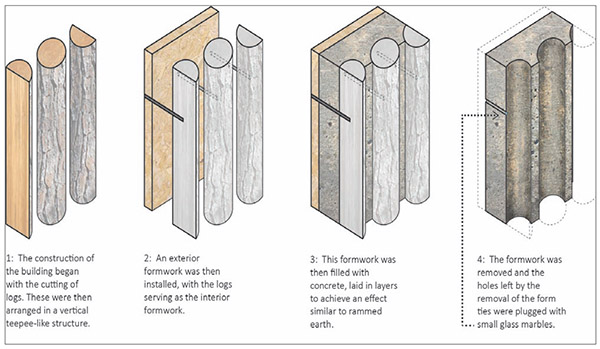
This is the production workflow. Is it really related to a “mathematical” approach? I don’t know. To be honest, I didn’t care about that much. Because Foad managed to use the coding skills he gained in the course.
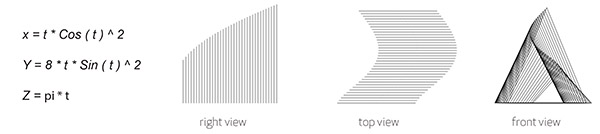
He studied and generated the interior volume and its contour sections. Similar to the other projects, he managed to explain the parametric equations. He developed the below Grasshopper code to implement this equation.
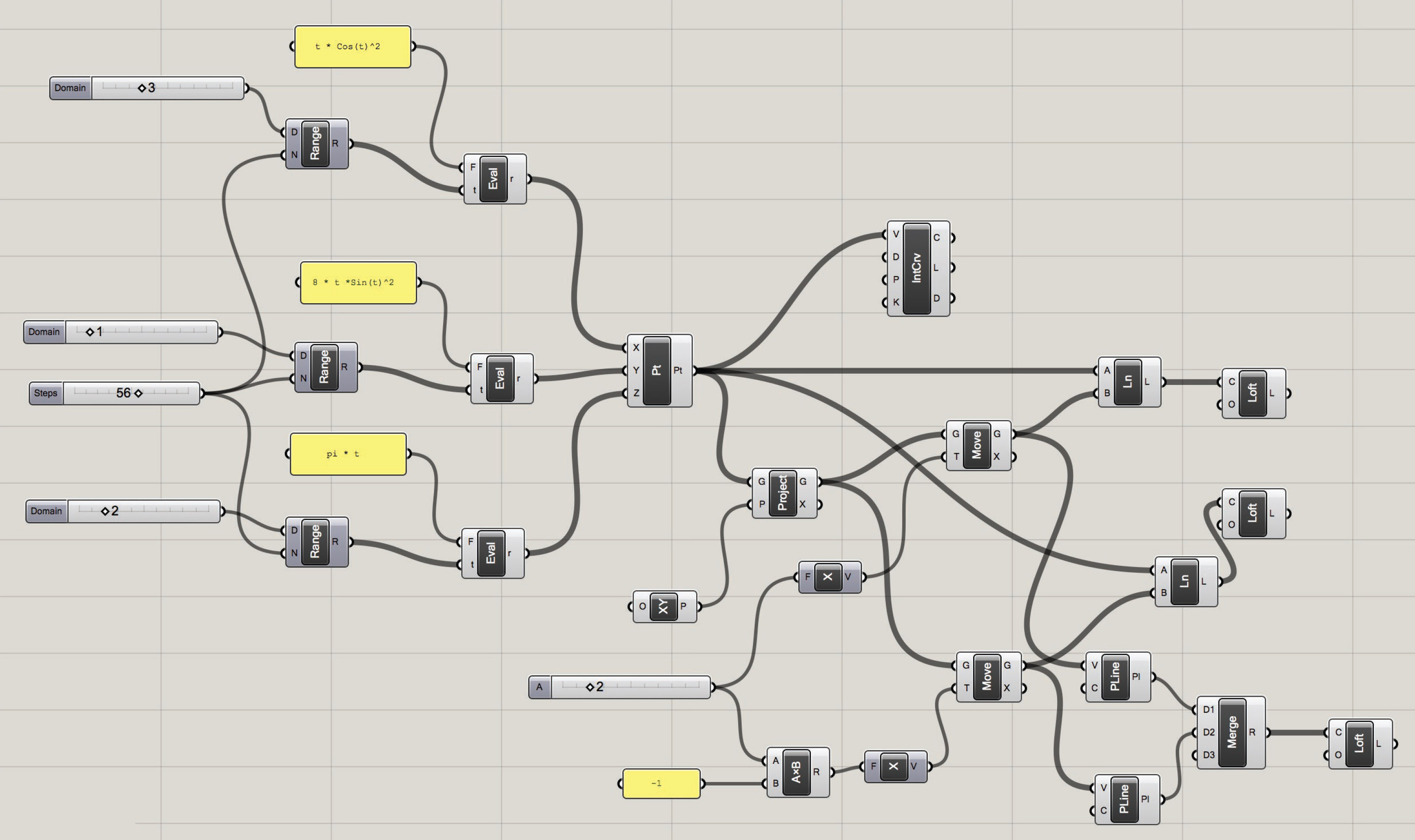
After the Grasshopper definition that calculates the surface using the parametric function, he produced the prototype.
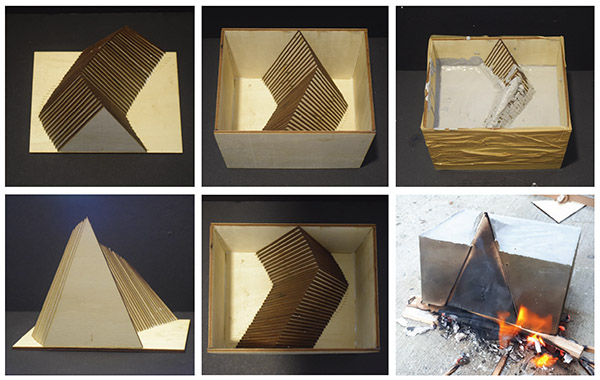
This is the production process. He actually built the interior volume from wooden planks, creating a mold. Then, he poured concrete. Finally, he burnt the wooden mold to create the void.
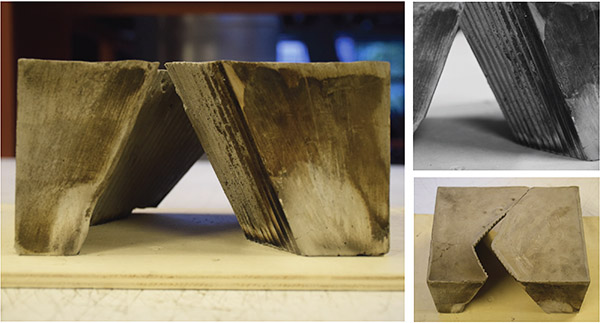
This is an interesting example of how designers can use and manipulate mathematics for their own purposes! Therefore, the student work of Design Mathematics course reminded me to include creativity at all phases of the course. I am happy with those extraordinary students and their ideas.
Cite this post
Related Posts
Data Structures in Grasshopper
June 8, 2023
Data structures and data matching principles are important to be able to design with Grasshopper. In this tutorial, I show data matching procedures with arithmetic operations. Then I repeat them in the production of geometric objects. I think it should be easier to use this programming language once the students understand the basic principles. Therefore it would be easier to design with it. Sometimes the design process of these diagrams proceeds from left to right (by induction) but sometimes it…
Rhino+Gh: Grasshopper for Beginners (7)
February 2, 2023
We continue with the Grasshopper for Beginners series by explaining Rhino+Gh workflow principles. What does GH add to Rhino‘s standard drawing and modeling functions? To put the question differently, what does GH do that conventional modeling programs, such as Rhino, can’t? What is the difference and relationship between Rhino+Gh? Let’s take an example to answer these questions. Our example is about parametrically describing a surface model and deriving its alternatives. First, we will try to create a surface using only…
Hello World! Grasshopper for Beginners (6)
January 17, 2023Let’s continue the Grasshopper for Beginners series. We start with the traditional “Hello World!” displayed on the Rhino screen: Placing the Components In most CAD programs, the text creation function, which is the equivalent of the Text command, is performed by a component called Text Tag (Tag) in GH. The Text Tag (Tag) component is in the Dimension panel under the Display tab. If you’re not comfortable with tabs and panels yet, you can revisit this section from the beginning….
Interface Continued: Grasshopper for Beginners (5)
December 21, 2022In this 5th episode of Grasshopper for Beginners, the interface continued by exploring the interface of Grasshopper. With the help of these two methods (tabs and search box), we can find the components. We can select them with the left click and place them on the canvas with the left click again. Now take random components and try to place them on the canvas with both methods. Therefore, components with different functions are the building blocks of GH definitions. The…
Design Exercise of Dataflow Diagrams
January 24, 2019
Here is a design exercise I’ve been giving to students. It aims to familiarize students with the concept of dataflow diagrams used in Grasshopper. Dataflow is a different concept than conventional computer programming. Here is a good comparison between control flow and dataflow languages. In most educational settings (such as courses and workshops) we concentrate on the fundamental issue of dataflow management via design projects. This requires us to think about a design exercise of dataflow diagrams. In the most…