
Data Structures in Grasshopper
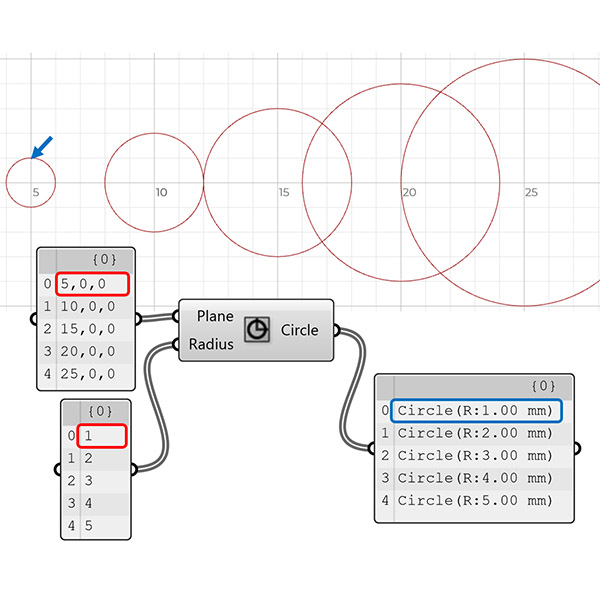
Data structures and data matching principles are important to be able to design with Grasshopper. In this tutorial, I show data matching procedures with arithmetic operations. Then I repeat them in the production of geometric objects. I think it should be easier to use this programming language once the students understand the basic principles. Therefore it would be easier to design with it. Sometimes the design process of these diagrams proceeds from left to right (by induction) but sometimes it is the reverse (deduction). Thus, a designer should know the expected outcome of the processes to be able to prepare the data structures suitable for it.
Sometimes Grasshopper is forgiving in converting data types (points to planes). In addition, sometimes there are exceptions to these principles. Also, in this presentation, you can see the input parameters with pattern inputs (such as 1s and 0s, or True and False). They operate differently from the standard input parameters. Here, I added the basic usage of Graft, Flatten, Weave, and Dispatch procedures with simple animations. Sometimes, the animation would be too fast to catch up with. You can pause and resume it however you like. I hope it will be helpful for those who struggle with learning the basic design concepts of Grasshopper and are stuck with ready-made tutorial definitions.
Cite this post
Related Posts
Rhino+Gh: Grasshopper for Beginners (7)
February 2, 2023
We continue with the Grasshopper for Beginners series by explaining Rhino+Gh workflow principles. What does GH add to Rhino‘s standard drawing and modeling functions? To put the question differently, what does GH do that conventional modeling programs, such as Rhino, can’t? What is the difference and relationship between Rhino+Gh? Let’s take an example to answer these questions. Our example is about parametrically describing a surface model and deriving its alternatives. First, we will try to create a surface using only…
Hello World! Grasshopper for Beginners (6)
January 17, 2023Let’s continue the Grasshopper for Beginners series. We start with the traditional “Hello World!” displayed on the Rhino screen: Placing the Components In most CAD programs, the text creation function, which is the equivalent of the Text command, is performed by a component called Text Tag (Tag) in GH. The Text Tag (Tag) component is in the Dimension panel under the Display tab. If you’re not comfortable with tabs and panels yet, you can revisit this section from the beginning….
Design Exercise of Dataflow Diagrams
January 24, 2019
Here is a design exercise I’ve been giving to students. It aims to familiarize students with the concept of dataflow diagrams used in Grasshopper. Dataflow is a different concept than conventional computer programming. Here is a good comparison between control flow and dataflow languages. In most educational settings (such as courses and workshops) we concentrate on the fundamental issue of dataflow management via design projects. This requires us to think about a design exercise of dataflow diagrams. In the most…
ARCH362 Midterm
March 27, 2015
About to finish the well-defined section of this year’s Parametric Modeling course, here are the mid-term questions I’ve asked; First question checks if the curve < > point conversions are well understood in Grasshopper. Evaluating a parametric curve and generating the closest point from another curve. This also requires a basic understanding of the use of the Grasshopper interface. The second question was testing a basic and classical use of attractors on grids of objects. Students generated their own grids…
Parametric Modeling Class: Subdivided Entities
March 14, 2012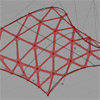
Today, we’ve studied fundamentals of component-based design methods. Using curves and surfaces as starting points, we’ve experienced ways of translating those entities via design criteria based on our purposes. First, a curve is used to construct a leaf structure. We’ve experienced dispatching data lists and combining them back together. Subdividing curves into points created further entities such as vectors and planes. We used those entities as inputs of regular drawing and modeling commands such as rectangles, or planar surfaces. This…