
Binary Branching using Macro
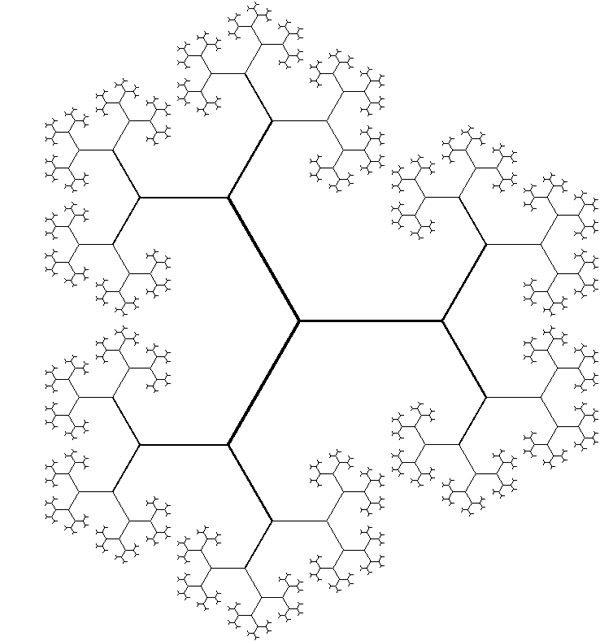
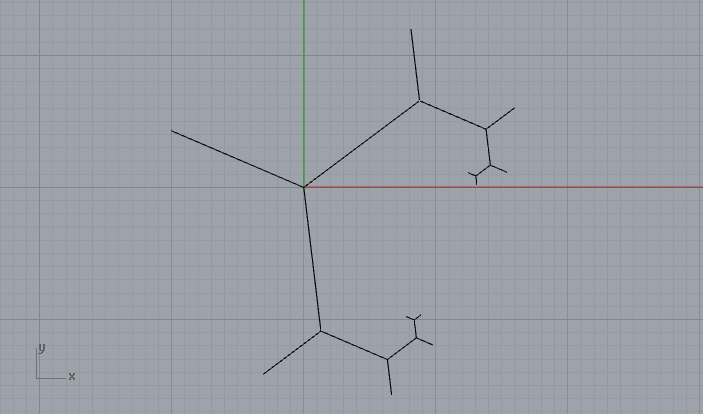
Today’s design computing class was about fractals. In Rhino, writing macro statements are very easy to learn as it just mimics your behaviors in a sequential text. There are a few syntactic rules that we should know. First, you should watch the command line carefully to understand the steps of your design process. Each command in Rhino requires different inputs from the user. In macro, you may enter these values or tell the macro to ask the user by typing “_pause”. Blank spaces work as if you hit enter. Below is one of the examples we’ve discussed in class. It is running from the first line step by step down until the end. I’ll explain each step.
! ; fractal binary branching
_line 0,0,0 _pause
_sellast
_divide split=yes 2 _enter
_sellast
_arraypolar 0,0,0 3 360 _enter

; As there is not loop in macro
; copy four below rows again and again
; to enable feedback in the fractal tree

_selnone
_divide _pause split=yes 2 _enter
_sellast
_arraypolar _pause _pause 3 360 _enter
The first line, “!” is used to cancel any command that might be running when the macro starts. It is important because you can run a macro while another command is running in Rhino. “;” represents the start of a comment that should not be treated as a command. It is important to take notes on your macros in order to make them understandable. The next line starts with the macro commands. “_” at every command makes sure that you can run this command in any language version of Rhino. It now sends “_line” to the command line and hits enter by typing a blank space after it. Rhino is asking for the first coordinate of the line. “0,0,0” feeds this input automatically. Please be careful about “,”s, and “.”s in Rhino. “,” is always used in coordinates in the form of x,y, and z. While “.” is used in digits such as, “0.5” which means 1/2. After sending the first coordinate and hitting enter by a blank space, Rhino now asks for the second point. At this time, a macro lets the user define a point as usual by entering “_pause” there. Macro just pauses and waits for the input to be completed by the user. After this entry, I chose to continue from the next line because this makes the macro more readable. Note that getting to the next line is also hits “enter” in Rhino. “_sellast” is in fact a Rhino command we never use normally. It selects the output of the last command. The macro continues by sending the “_divide” command and changing a parameter of it. As you see, macro directly resembles the way you use command line inputs in a modeling process. No conditional statements or loops, in fact, nothing algorithmic here. However, you may use CTRL+C and CTRL+V to enable a kind of loop, making a part of the macro seemingly run recursively.
Cite this post
Related Posts
Drawing Fractal Tree
December 11, 2024
A fractal is a complex geometric shape that we can split into parts, each of which is a reduced-scale copy of the whole. This property is self-similarity. Fractals often exhibit patterns that repeat at different scales. We can find fractals in nature, such as in snowflakes, mountain ranges, trees, and clouds. We can also generate them mathematically. Fractals have applications in various fields such as physics, biology, and computer graphics. We use them to model natural phenomena, compress data, and…
Fractal Trees
April 11, 2015
Based on this post, the problem of modeling tree-like fractal shapes is still a good question for the early years of computational design education. Last time, I used Rhino’s macro to study these fractal trees in an “impossibly” limited interface. But this time I used a VB.NET script. Here is the code inside of the VB.net component: Here are the inputs. x is the number of iterations. The Crv input is a line needed for the first iteration. t represents how…
Trees and Recursive Computing
March 15, 2012
This topic of trees and recursive computing is inspired by the method shown here at the Rhino Python 101 Primer. This is a beautiful method of recursion that creates tree-like shapes, composed of arcs. I constructed these arcs by using the Arc SED (start, end, direction) method. This requires start and end points and a vector that is tangent to the arc (at the start point). Therefore, the overall look of a chain of these constructions creates curves with continuous…
Gaudi Column Macro
March 7, 2015
Gaudi-like columns are generated as part of the “boolean” classes of Design Computing. The most inspiring, beautiful, and ugly variations are often done by boolean intersection, as this operation is the surprising one of the three brothers. While the class deals with the concept of emergence once again via solid and void relationships, constructive solid modeling techniques are introduced. Although it is widely used as a spatial analysis approach in architecture, there are some examples of using boolean algebra in…
A Text Effect
January 2, 2015
This is a macro exercise in Rhino, showing that Rhino is pretty much capable of automating some cool text effects. Just copy and paste the below code into the command bar of the Rhino, or open the macro editor by typing macro edit, then paste it there and press play. You’ll enter any string when prompted, then the macro handles the rest of the process. You can play with the parameters by changing the numeric values you see in the…