
Fractal Trees
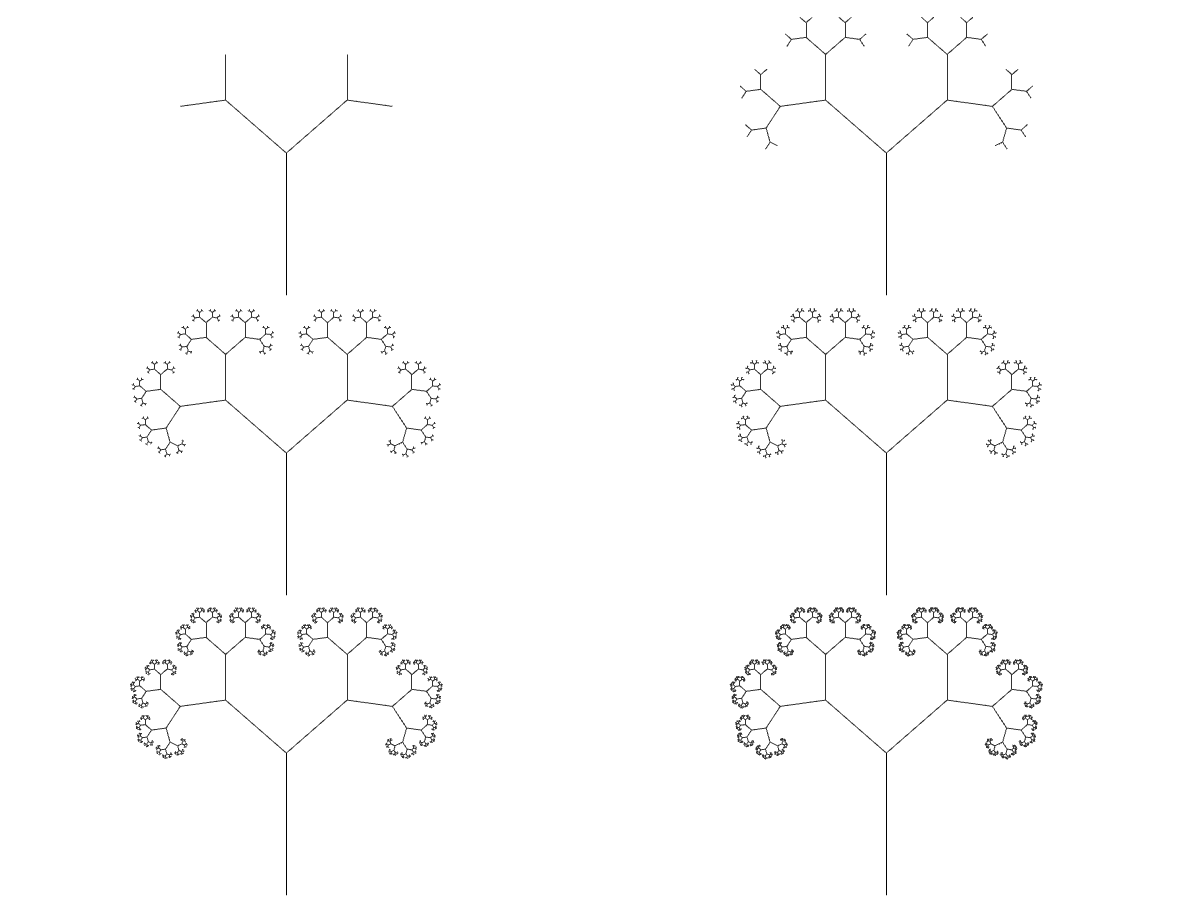
Based on this post, the problem of modeling tree-like fractal shapes is still a good question for the early years of computational design education. Last time, I used Rhino’s macro to study these fractal trees in an “impossibly” limited interface. But this time I used a VB.NET script.
Here is the code inside of the VB.net component:
Dim i,j As Int32
Dim d(15,65536) As Line
Dim temppoint As Point3d
Dim tempdirection1, tempdirection2 As Vector3d
Dim tempbranch1, tempbranch2 As Line
Dim tempdist As Double
Dim vector As New Vector3d(0, 0, 1)
Dim result As New List (Of Line)
d(0, 0) = c

For i = 0 To x
    For j = 0 To (2 ^ i) - 1
    temppoint = d(i, j).To
    tempdirection1 = d(i, j).Direction
    tempdirection2 = d(i, j).Direction
    tempdirection1.Rotate(t, vector)
    tempdirection2.Rotate(-y, vector)
    tempdist = d(i, j).Length * k
    tempbranch1 = New Line(temppoint, tempdirection1, tempdist)
    tempbranch2 = New Line(temppoint, tempdirection2, tempdist)
    d(i + 1, j * 2) = tempbranch1
    d(i + 1, (j * 2) + 1) = tempbranch2
    result.Add(tempbranch1)
    result.Add(tempbranch2)
    Next
Next
A = result
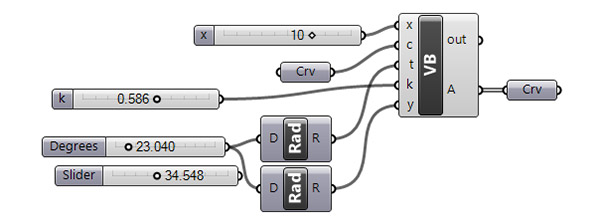
Here are the inputs. x is the number of iterations. The Crv input is a line needed for the first iteration. t represents how the tree is going to spread (the angles). Finally, k input is the scale factor for each iteration. The code has two nested loops. The first loop is responsible for the general number of iterations. Then, the second inner loop checks all the lines in the list and draws new lines using the input parameters. You can play with these inputs via Number Sliders as above. In addition, you can play with the code itself to generate interesting results. In the below animation, I played with the t input, which controls the rotation angles for every line segment in every iteration.

You can re-build the definition by looking at the image above and the explanation. While using the VB.net code, you should define the inputs and their data types. You can see this in the above code’s first line.
Cite this post
Related Posts
Trees and Recursive Computing
March 15, 2012
This topic of trees and recursive computing is inspired by the method shown here at the Rhino Python 101 Primer. This is a beautiful method of recursion that creates tree-like shapes, composed of arcs. I constructed these arcs by using the Arc SED (start, end, direction) method. This requires start and end points and a vector that is tangent to the arc (at the start point). Therefore, the overall look of a chain of these constructions creates curves with continuous…
Tattoo Design
April 27, 2023
Here is a tattoo design I am currently developing by using Grasshopper. 11 years ago, I developed a Grasshopper definition that approximates Julia Sets here. One of the experimental outputs of that definition looks suitable for a tattoo design. It is a beautiful fractal shape. But I am not perfectly sure about its suitability for a tattoo. Here it is: This was generated by the function z2+c and the parameters were: 0.3+0.49i with 25 iterations. I experimented a bit more…
Binary Branching using Macro
April 15, 2013
Today’s design computing class was about fractals. In Rhino, writing macro statements are very easy to learn as it just mimics your behaviors in a sequential text. There are a few syntactic rules that we should know. First, you should watch the command line carefully to understand the steps of your design process. Each command in Rhino requires different inputs from the user. In macro, you may enter these values or tell the macro to ask the user by typing…
Tree of Life
August 12, 2023
This Grasshopper exercise is a special one. I used Hoopsnake components to develop the branching design I studied earlier here. This time I multiplied the number and orientations of several tree structures to generate my interpretation of the Tree of Life. The challenging part of the algorithm was to finalize every branch tangent to a predefined circle. Group 3 handles this issue by utilizing a Blend Curve component. There are many Number Sliders to play with the design. Thus, I…
Animated Tree Growth
May 26, 2023
The Animated Tree Growth is an interesting study for Grasshopper. First, I developed a regular tree generation definition similar to those I studied earlier, here, here, and here. In component group 1, I develop an initial generator arc. Then, in group 2, I generate the fractal tree by using iteration. I did this with the help of the Anemone add-on. The interesting and original part of this definition is group number 3. Here I am trying to trace the growth…