
SPEC, Data Lists and Trees
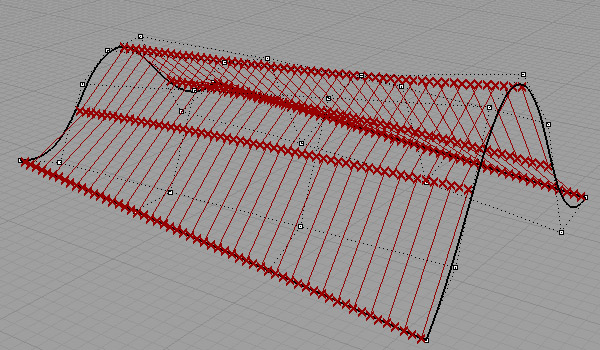
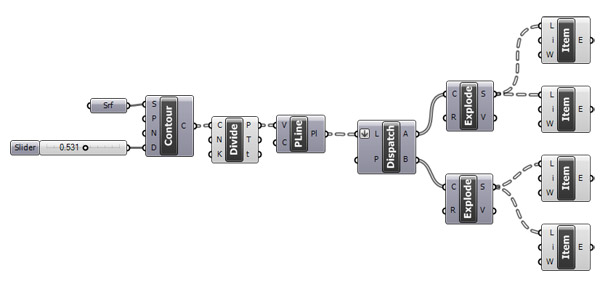
Today, we’ve studied ways of representing multiple data structures in Grasshopper at ARCH 362. As of our last week’s experience, sometimes (most of the time actually) we’ll need to work with vast amount of data. We’ll have to control them in order to open door for further explorations. Today’s exercise was a good example of this “sustainable” process of data management. All functionality of Grasshopper is based on data matching. From short-list, long-list matching, to the structures of data trees. The simple solution to a one-point attractor on a grid represents this very well. Also the homework problem of SPEC’s parametric re-modeling still remains, but with a better understanding on it’s data structure now. The image below shows the contours of any free-form surface, “dispatched” into two lists, then exploded into segments and then, correct items are selected. There are other methods to solve this problem, but this definition might be the most basic one, highlighting the use of data trees and their manipulation. Please check out essential data tree operations on this website and other examples found in outer links.
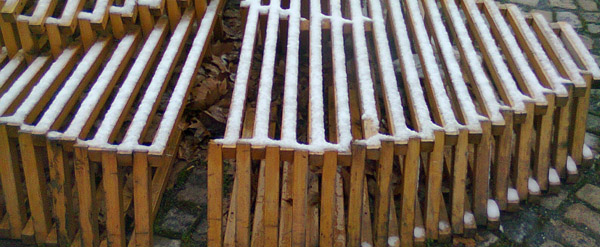
The most important part of today’s topic was the need to be experienced in data lists and data tree operations. Next week, we’ll get into them deeper. Please take a look at the definition below and add panels to track the manipulation of data within the diagram.
Also, we’ll deal with basic methods that are used to prepare geometric objects for fabrication. Today’s homework was the modeling of a tree, but not issued yet.
Cite this post
Related Posts
Data Domains in Grasshopper
March 24, 2024
In this short tutorial, I am showing the essentials of data domains in Grasshopper. A domain is a data type in Grasshopper that represents a portion of the 1d or 2d number space. This requires a starting and ending point in those spaces. In 1d, these points are two numbers. Then, the domain represents all the numbers between them. In 2d, a data domain is represented by two coordinates (u, v). This presentation illustrates this concept with the area defined…
Data Structures in Grasshopper
June 8, 2023
Data structures and data matching principles are important to be able to design with Grasshopper. In this tutorial, I show data matching procedures with arithmetic operations. Then I repeat them in the production of geometric objects. I think it should be easier to use this programming language once the students understand the basic principles. Therefore it would be easier to design with it. Sometimes the design process of these diagrams proceeds from left to right (by induction) but sometimes it…
Rhino+Gh: Grasshopper for Beginners (7)
February 2, 2023
We continue with the Grasshopper for Beginners series by explaining Rhino+Gh workflow principles. What does GH add to Rhino‘s standard drawing and modeling functions? To put the question differently, what does GH do that conventional modeling programs, such as Rhino, can’t? What is the difference and relationship between Rhino+Gh? Let’s take an example to answer these questions. Our example is about parametrically describing a surface model and deriving its alternatives. First, we will try to create a surface using only…
Hello World! Grasshopper for Beginners (6)
January 17, 2023Let’s continue the Grasshopper for Beginners series. We start with the traditional “Hello World!” displayed on the Rhino screen: Placing the Components In most CAD programs, the text creation function, which is the equivalent of the Text command, is performed by a component called Text Tag (Tag) in GH. The Text Tag (Tag) component is in the Dimension panel under the Display tab. If you’re not comfortable with tabs and panels yet, you can revisit this section from the beginning….
History: Grasshopper for Beginners (2)
November 23, 2022We continue the Grasshopper for Beginners (2) series with the data flow programming concept. Control flow diagrams we use in traditional programming languages control the sequence of executed commands. In data flow diagrams, the focus is not on the order of commands but on how the data progresses. In the previous example, it doesn’t matter whether the Circle and Polyline command runs first. As a result, both are prerequisites for Extrude. Extrude command will not be executed until both are…