
Data Domains in Grasshopper
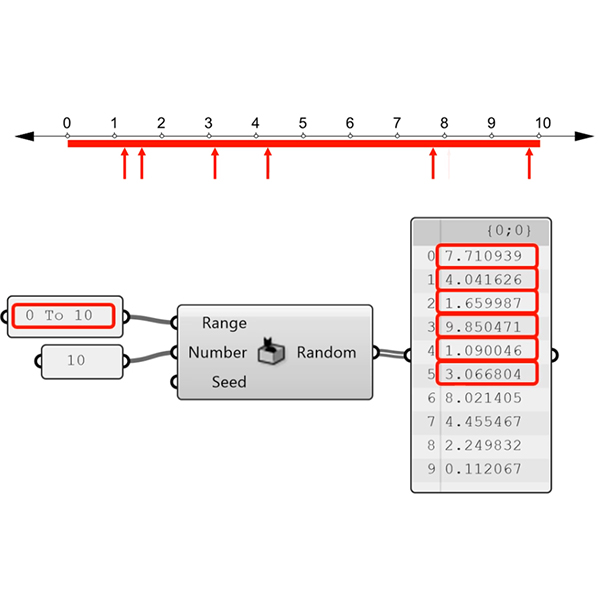
In this short tutorial, I am showing the essentials of data domains in Grasshopper. A domain is a data type in Grasshopper that represents a portion of the 1d or 2d number space. This requires a starting and ending point in those spaces. In 1d, these points are two numbers. Then, the domain represents all the numbers between them. In 2d, a data domain is represented by two coordinates (u, v). This presentation illustrates this concept with the area defined by the rectangle with two opposite corners at these two coordinates. Besides, I gave several examples from Grasshopper components that require domain data type.
This tutorial shows the fundamental utilization of data domains in Grasshopper’s parametric curve and surface operations. For example, when we reparameterize a curve, we remap its domain into another domain between 0 and 1. This is related to curve and surface evaluations and I find it useful in teaching the necessity of reparameterization in several design conditions. The animations show how Grasshopper calculates the parametric points on curves and surfaces. Therefore, we can extend the concept of data domains into its mathematical meaning. When we trim or extend a parametric curve, we change its domain according to the criteria we define. I hope I will be explaining these in my new book on design mathematics.
Cite this post
Related Posts
Rhino+Gh: Grasshopper for Beginners (7)
February 2, 2023
We continue with the Grasshopper for Beginners series by explaining Rhino+Gh workflow principles. What does GH add to Rhino‘s standard drawing and modeling functions? To put the question differently, what does GH do that conventional modeling programs, such as Rhino, can’t? What is the difference and relationship between Rhino+Gh? Let’s take an example to answer these questions. Our example is about parametrically describing a surface model and deriving its alternatives. First, we will try to create a surface using only…
Hello World! Grasshopper for Beginners (6)
January 17, 2023Let’s continue the Grasshopper for Beginners series. We start with the traditional “Hello World!” displayed on the Rhino screen: Placing the Components In most CAD programs, the text creation function, which is the equivalent of the Text command, is performed by a component called Text Tag (Tag) in GH. The Text Tag (Tag) component is in the Dimension panel under the Display tab. If you’re not comfortable with tabs and panels yet, you can revisit this section from the beginning….
History: Grasshopper for Beginners (2)
November 23, 2022We continue the Grasshopper for Beginners (2) series with the data flow programming concept. Control flow diagrams we use in traditional programming languages control the sequence of executed commands. In data flow diagrams, the focus is not on the order of commands but on how the data progresses. In the previous example, it doesn’t matter whether the Circle and Polyline command runs first. As a result, both are prerequisites for Extrude. Extrude command will not be executed until both are…
Data Recorder and Surfaces
February 7, 2012
In this experiment, I’m trying to use data recorder to change components on a surface. The component part is a standart triangular construction, but the attractor points are defined by a 2D slider that is connected to a data recorder. Data recorder remembers last 15 points, while you move the 2d slider, last 15 points are projected on the base surface. This creates an illusion as if a “snake” game on a surface. Definition then uses the closes point distance…
Data Structures in Grasshopper
June 8, 2023
Data structures and data matching principles are important to be able to design with Grasshopper. In this tutorial, I show data matching procedures with arithmetic operations. Then I repeat them in the production of geometric objects. I think it should be easier to use this programming language once the students understand the basic principles. Therefore it would be easier to design with it. Sometimes the design process of these diagrams proceeds from left to right (by induction) but sometimes it…