
Generating Harmonic Motion
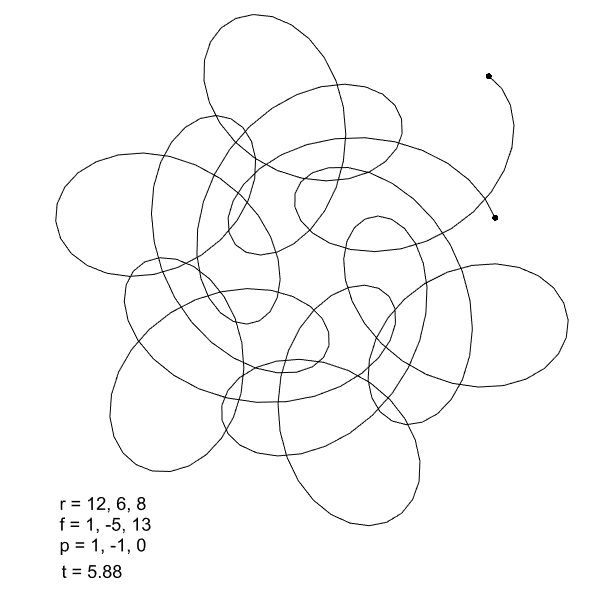
While trying to program the curves produced by Spirograph toys in Grasshopper, I took a slightly different path. The topic eventually led to a broader heading: harmonic motion, and from there, to the Fourier Series we looked at previously. This simple Python code models Fourier Synthesis, driven by circles of different radii in a very straightforward way. The Python component sets up a loop that calculates the effect of each circle to the x and y values, individually. In this loop, the angle of each circle at a given time t (provided as input) is calculated. You can enter the radii of however many circles you want sequentially into the list in the r input. The f input gives the rotation frequency of the circles, so this value is multiplied by t to find the angle at a specific moment. The p list represents the phase, allowing us to change the initial angle values of the circles. Ultimately, after calculating an angle value for each circle, the cosine and sine of this value are added to our x and y coordinates. This process is repeated for all circles, until we find the total x and total y values. Let’s check a few different results:



import math
from Rhino.Geometry import Point3d, Polyline
pts = []
t = 0.0
while t < T:
    x = 0.0
    y = 0.0
    for i in range(len(r)):
        angle = f[i] * t + p[i]
        x += r[i] * math.cos(angle)
        y += r[i] * math.sin(angle)
    pts.append(Point3d(x, y, 0))
    t += step
path = Polyline(pts)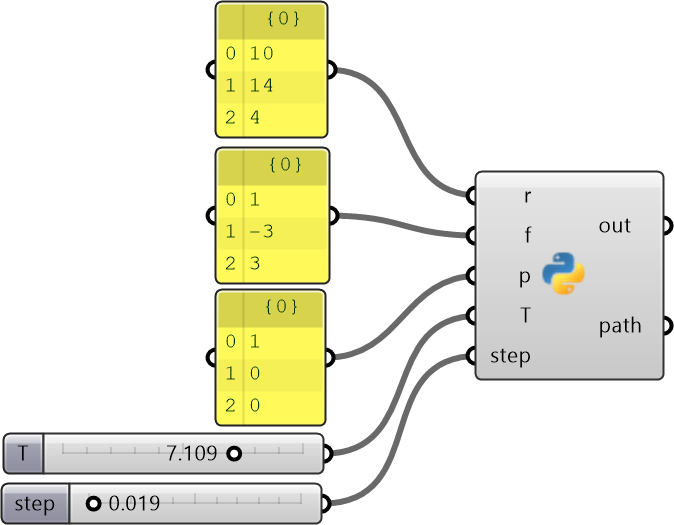
If you examine it a bit, some of the results resemble the path followed by a weight hanging from the ceiling as it swings like a pendulum. This has been the simplest and most fundamental method I’ve achieved in this field so far. By solving the loop inside the Python component, there was no need to use an add-on. My technical knowledge on this subject is very limited. We can continue reading about this topic under headings like Additive Harmonic Synthesis or Fourier Synthesis. However, we have revisited the Fourier Series we looked at earlier in a much simpler, but less visual way. Be careful about the step input: if you make it too small, your computer can freeze.
Cite this post
Related Posts
Discrete Fourier Transform
May 8, 2025
The Fourier Transform is a powerful mathematical technique that allows us to analyze the different frequency components within a signal or shape. Its discrete version, the Discrete Fourier Transform (DFT), is used when working with numerical data. I studied the Fourier Series here before. One of the most fascinating aspects of the DFT is that it can represent a signal or shape using rotating circles (or vectors). Each circle corresponds to a specific frequency, amplitude, and phase. When connected in…
Fourier Series
November 14, 2022
This is my first experiment with the Fourier Series in Grasshopper using Python. This is a technique to decompose functions into their frequency components. Fourier series have a wide range of applications in physics and engineering. What makes it especially fascinating, however, is the visual intuition it offers. It looks like a kind of mathematical “magic” that emerges from the geometry of frequency. I explored several excellent visual explanations online, including those by Coding Train, 3Blue1Brown, and Mathologer, each offering…
Damped Harmonic Motion
October 7, 2026
Have you ever thought about making a damped pendulum in Grasshopper? I have no idea why, but I did. I just decided to transfer a Python snippet I found online into a Grasshopper definition. Here, the Initial Angle (Radians) Number slider sets the initial angle to any value from 0 to Pi. The letter G represents the acceleration due to gravity (approximately 9.81 m/s2). This is the primary force pulling the pendulum downward. As you know, pendulums wouldn’t swing without…
Fermat’s Nightmare
October 14, 2026
Revisiting a specific mathematical phenomenon that I previously explored twice, here (in 2017) and here (in 2011), from a different angle in 2026 now. This was the final video (from 2023) that I found in my junk folder during the blog’s resurrection. Today, designers mostly know Fermat through the famous 137.5-degree angle of rotation, which is the mathematical formula used to describe the arrangement of sunflower seeds. However, today I will speculate on a nightmare of Fermat’s. Because Fermat, in…
Flow Map on Terrains
September 11, 2026
We previously looked at the terrain generator script we used in midterm projects with first-year architecture students over here. Later on, we added a few analysis modules to this tool. You might remember the slope analysis tool from this link. Today’s topic is another type of analysis: flow. The idea for this code wasn’t actually mine; I developed it by looking at an existing script based on Serkan Uysal’s suggestion. Unfortunately, I don’t know who originally wrote it. Keeping track…