
Aligned Text in Grasshopper
Currently, Rhinoceros does not offer the capability for an aligned text onto a curve, to the best of my knowledge. However, Grasshopper, with its latest version, provides a solution for such tasks by offering a range of text components. For my current project, I am studying an installation. It incorporates various typographic effects, and Grasshopper has become an invaluable tool in this regard.
Nevertheless, it is important to note that Grasshopper’s native text components do not yet include a comprehensive selection of fonts. However, there is a simple definition that can align any given text onto a specified curve set. When using this definition, it is crucial to be cautious. Because the “curve frame” component, as it may generate upside-down planes for reasons that remain unclear. It is advisable to employ the “horizontal frames” component instead, as it ensures proper alignment of the text.
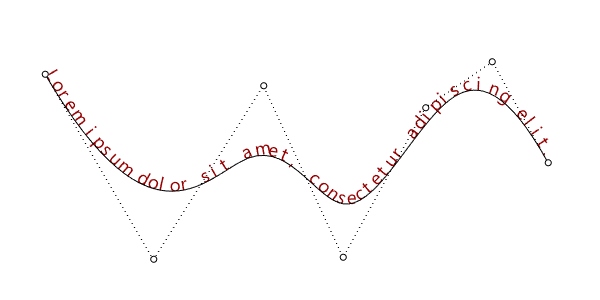
Although the provided definition serves as a starting point, it can be further enhanced to exercise greater control over letter spacing, letter sizes, and other relevant parameters. By incorporating additional modifications and adjustments, I can tailor the definition of aligned text to meet specific requirements and achieve the desired typographic effects.
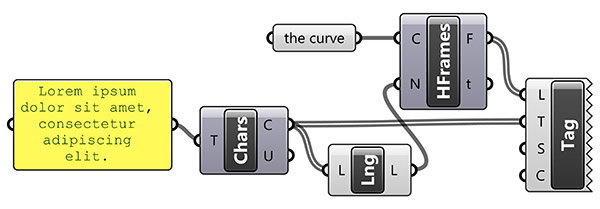
As I continue my studies and exploration of this installation project, I am excited to delve deeper into the possibilities. Grasshopper can offer it for integrating typography and design. While challenges such as the limited font selection in Grasshopper’s native text components persist, I am confident that with further advancements and updates, the software will continue to evolve, empowering designers to create even more intricate and visually captivating installations. Here is the Grasshopper file:
Cite this post
Related Posts
ASCII Art in Grasshopper
August 24, 2024
ASCII art is a graphic design technique that uses characters from the ASCII (American Standard Code for Information Interchange) set to create images, symbols, and designs. This form of art involves arranging text characters to form a visual representation of objects, scenes, or abstract patterns. I first encountered this art form in the 90s through readme text files and computer games. Years later, attempting to automate it in Grasshopper was a lot of fun. My initial goal was to calculate…
A Text Effect
January 2, 2015
This is a macro exercise in Rhino, showing that Rhino is pretty much capable of automating some cool text effects. Just copy and paste the below code into the command bar of the Rhino, or open the macro editor by typing macro edit, then paste it there and press play. You’ll enter any string when prompted, then the macro handles the rest of the process. You can play with the parameters by changing the numeric values you see in the…
Curvature Map on Terrains
September 17, 2026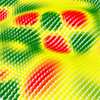
This is the last of the site analysis tools we previously used in the midterm project of first-year architecture education. As you may recall, we previously introduced a tool that generates topographies based on specific parameters. Afterward, we examined two tools that perform slope and flow analyses on these topographies. Today, we are presenting a tool that analyzes curvature. This topic actually constitutes one of the interesting intersection points between architectural design and differential geometry. Curvature is not something architects…
Flow Map on Terrains
September 11, 2026
We previously looked at the terrain generator script we used in midterm projects with first-year architecture students over here. Later on, we added a few analysis modules to this tool. You might remember the slope analysis tool from this link. Today’s topic is another type of analysis: flow. The idea for this code wasn’t actually mine; I developed it by looking at an existing script based on Serkan Uysal’s suggestion. Unfortunately, I don’t know who originally wrote it. Keeping track…
Manage Rhino Viewport in Grasshopper
September 13, 2013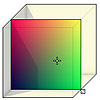
This simple vb.net component controls the Rhino viewport background without a need to enter its options panel. It is used to change the viewport background color and grid visibility quickly within Grasshopper. Here is the definition file: [GHX: 0.9.0056]. In order to be able to return to default settings, I put a “default” toggle. Just click on it to “false” state, then the Rhino background color can be changed by the B input. This component also handles the grid. However I…