
Manage Rhino Viewport in Grasshopper
This simple vb.net component controls the Rhino viewport background without a need to enter its options panel. It is used to change the viewport background color and grid visibility quickly within Grasshopper. Here is the definition file: [GHX: 0.9.0056]. In order to be able to return to default settings, I put a “default” toggle. Just click on it to “false” state, then the Rhino background color can be changed by the B input. This component also handles the grid. However I couldn’t find a working method to hide and show the Rhino grid within Grasshopper, so I tweaked that effect by changing the grid colors to be the same as the background color. However, if your return to “true” in default input, the grid also returns to Rhino’s default colors.
If D = True Then
	Rhino.ApplicationSettings.AppearanceSettings.ViewportBackgroundColor = Color.FromArgb(0, 157, 163, 170)
Else
	Rhino.ApplicationSettings.AppearanceSettings.ViewportBackgroundColor = B
End If
If G = False And D = False Then
	Rhino.ApplicationSettings.AppearanceSettings.GridThickLineColor = B
	Rhino.ApplicationSettings.AppearanceSettings.GridThinLineColor = B
	Rhino.ApplicationSettings.AppearanceSettings.GridXAxisLineColor = B
	Rhino.ApplicationSettings.AppearanceSettings.GridYAxisLineColor = B
	Rhino.ApplicationSettings.AppearanceSettings.GridZAxisLineColor = B
Else If G = False And D = True Then
	Rhino.ApplicationSettings.AppearanceSettings.GridThickLineColor = Color.FromArgb(0, 157, 163, 170)
	Rhino.ApplicationSettings.AppearanceSettings.GridThinLineColor = Color.FromArgb(0, 157, 163, 170)
	Rhino.ApplicationSettings.AppearanceSettings.GridXAxisLineColor = Color.FromArgb(0, 157, 163, 170)
	Rhino.ApplicationSettings.AppearanceSettings.GridYAxisLineColor = Color.FromArgb(0, 157, 163, 170)
	Rhino.ApplicationSettings.AppearanceSettings.GridZAxisLineColor = Color.FromArgb(0, 157, 163, 170)
Else
	Rhino.ApplicationSettings.AppearanceSettings.GridThickLineColor = Color.FromArgb(0, 129, 134, 140)
	Rhino.ApplicationSettings.AppearanceSettings.GridThinLineColor = Color.FromArgb(0, 147, 153, 160)
	Rhino.ApplicationSettings.AppearanceSettings.GridXAxisLineColor = Color.FromArgb(0, 150, 75, 75)
	Rhino.ApplicationSettings.AppearanceSettings.GridYAxisLineColor = Color.FromArgb(0, 75, 150, 75)
	Rhino.ApplicationSettings.AppearanceSettings.GridZAxisLineColor = Color.FromArgb(0, 75, 75, 150)
End If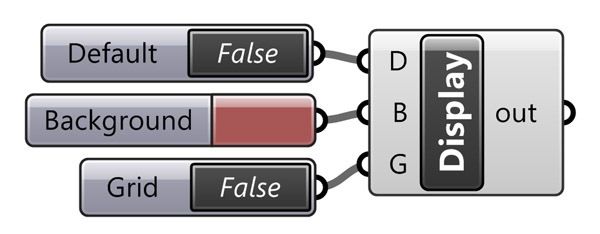
This can be handy for example if you are working on a display installation, using Firefly.
Cite this post
Related Posts
Rhino Viewport Colors
August 8, 2023
Recently I found this VB.net component in an old Grasshopper project. I am not sure if it is mine or not, but I wanted to share it with you. This code modifies Rhino viewport colors quickly without entering the Rhino options window. I frequently modify the viewport colors and grid settings to create renders or animations within Grasshopper. This is why, this component might be useful in making quick modifications to the screen colors. Here is the VB.net code inside…
Curvature Map on Terrains
September 17, 2026
This is the last of the site analysis tools we previously used in the midterm project of first-year architecture education. As you may recall, we previously introduced a tool that generates topographies based on specific parameters. Afterward, we examined two tools that perform slope and flow analyses on these topographies. Today, we are presenting a tool that analyzes curvature. This topic actually constitutes one of the interesting intersection points between architectural design and differential geometry. Curvature is not something architects…
Flow Map on Terrains
September 11, 2026
We previously looked at the terrain generator script we used in midterm projects with first-year architecture students over here. Later on, we added a few analysis modules to this tool. You might remember the slope analysis tool from this link. Today’s topic is another type of analysis: flow. The idea for this code wasn’t actually mine; I developed it by looking at an existing script based on Serkan Uysal’s suggestion. Unfortunately, I don’t know who originally wrote it. Keeping track…
Aligned Text in Grasshopper
January 7, 2014
Currently, Rhinoceros does not offer the capability for an aligned text onto a curve, to the best of my knowledge. However, Grasshopper, with its latest version, provides a solution for such tasks by offering a range of text components. For my current project, I am studying an installation. It incorporates various typographic effects, and Grasshopper has become an invaluable tool in this regard. Nevertheless, it is important to note that Grasshopper’s native text components do not yet include a comprehensive…
Subdivide by Image Contrast
October 17, 2012
This was my old plan to work with images in Grasshopper. Certainly, that was not the result I expected, but this could be counted as a starting point. After seeing beautiful circle packing compositions here, I decided to program Grasshopper, so that it’ll create a subdivision, based on image data. This was the initial version, just subdividing a plane with Voronoi points and visualizing it according to the image’s color values of proper UV coordinates. There is no interpretation on…