
Rhino Viewport Colors
Recently I found this VB.net component in an old Grasshopper project. I am not sure if it is mine or not, but I wanted to share it with you. This code modifies Rhino viewport colors quickly without entering the Rhino options window. I frequently modify the viewport colors and grid settings to create renders or animations within Grasshopper. This is why, this component might be useful in making quick modifications to the screen colors. Here is the VB.net code inside of the component:
Private Sub RunScript(ByVal D As Boolean, ByVal B As System.Drawing.Color, ByVal G As System.Drawing.Color)
	If D = True Then
		Rhino.ApplicationSettings.AppearanceSettings.ViewportBackgroundColor = Color.FromArgb(0, 157, 163, 170)
	End If
	If D = False Then
		Rhino.ApplicationSettings.AppearanceSettings.ViewportBackgroundColor = B
	End If
	Rhino.ApplicationSettings.AppearanceSettings.GridThickLineColor = G
	Rhino.ApplicationSettings.AppearanceSettings.GridThinLineColor = G
	Rhino.ApplicationSettings.AppearanceSettings.GridXAxisLineColor = G
	Rhino.ApplicationSettings.AppearanceSettings.GridYAxisLineColor = G
	Rhino.ApplicationSettings.AppearanceSettings.GridZAxisLineColor = G
End Sub
As you can see, it only has several conditional statements, modifying the methods from Rhinocommon. You can copy and paste this component into your definition. It should work immediately, modifying the Rhino settings. By switching the first input (Default), you can always revert back to the default Rhino viewport colors. However, unfortunately, I couldn’t find a method to hide the grid. Thus, if you want to close the grid, you can just connect the same viewport background color to the grid color as a workaround.
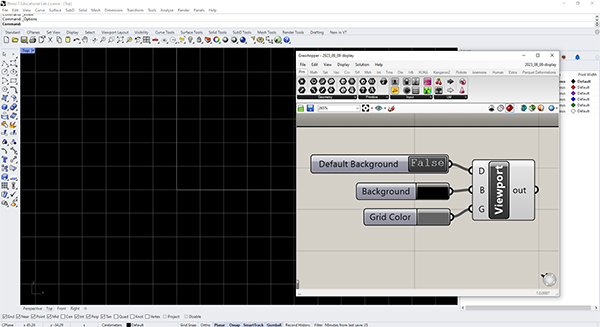
It would be interesting to advance this more by reading Rhinocommon and developing a better and more capable add-on for Grasshopper. In addition to Rhino viewport colors and grid settings, some other options can be better altered via a similar component. I am not sure I have enough time for this but maybe one day I can work on it. However, I hope this is already useful for some people. Maybe a Grasshopper Python equivalent might be another good exercise.
Cite this post
Related Posts
Manage Rhino Viewport in Grasshopper
September 13, 2013
This simple vb.net component controls the Rhino viewport background without a need to enter its options panel. It is used to change the viewport background color and grid visibility quickly within Grasshopper. Here is the definition file: [GHX: 0.9.0056]. In order to be able to return to default settings, I put a “default” toggle. Just click on it to “false” state, then the Rhino background color can be changed by the B input. This component also handles the grid. However I…
Tattoo Design
April 27, 2023
Here is a tattoo design I am currently developing by using Grasshopper. 11 years ago, I developed a Grasshopper definition that approximates Julia Sets here. One of the experimental outputs of that definition looks suitable for a tattoo design. It is a beautiful fractal shape. But I am not perfectly sure about its suitability for a tattoo. Here it is: This was generated by the function z2+c and the parameters were: 0.3+0.49i with 25 iterations. I experimented a bit more…
Fractal Trees
April 11, 2015
Based on this post, the problem of modeling tree-like fractal shapes is still a good question for the early years of computational design education. Last time, I used Rhino’s macro to study these fractal trees in an “impossibly” limited interface. But this time I used a VB.NET script. Here is the code inside of the VB.net component: Here are the inputs. x is the number of iterations. The Crv input is a line needed for the first iteration. t represents how…
Camera Animation
April 28, 2014
Here is the simple Grasshopper definition that activates Rhinoceros’ camera by given parameters. Camera position is determined by the “point-oriented” method here. This means that you have to have a target point for the camera first. In fact, I was trying to find a suitable command for getting the actual camera position of the Rhinoceros but I think it is impossible (for now). I couldn’t track the camera object by its ID number also. There are some Grasshopper components that deal with…
Revisiting RhinoScript
July 19, 2013
Recently, I returned to old fashion RhinoScripts in order to recapture its idea and functionalities again. After almost 10 years, this is my first experiment on creating a custom function that draws hexagonal grids. I tried to implement a fast process for it, however, there could be much faster ones. This script focuses on using functions, variables, and object arrays. I’ll continue to make more of these simple exercises and revisit some of the older studies on this blog page…