
A Tip About Using Pipe Component
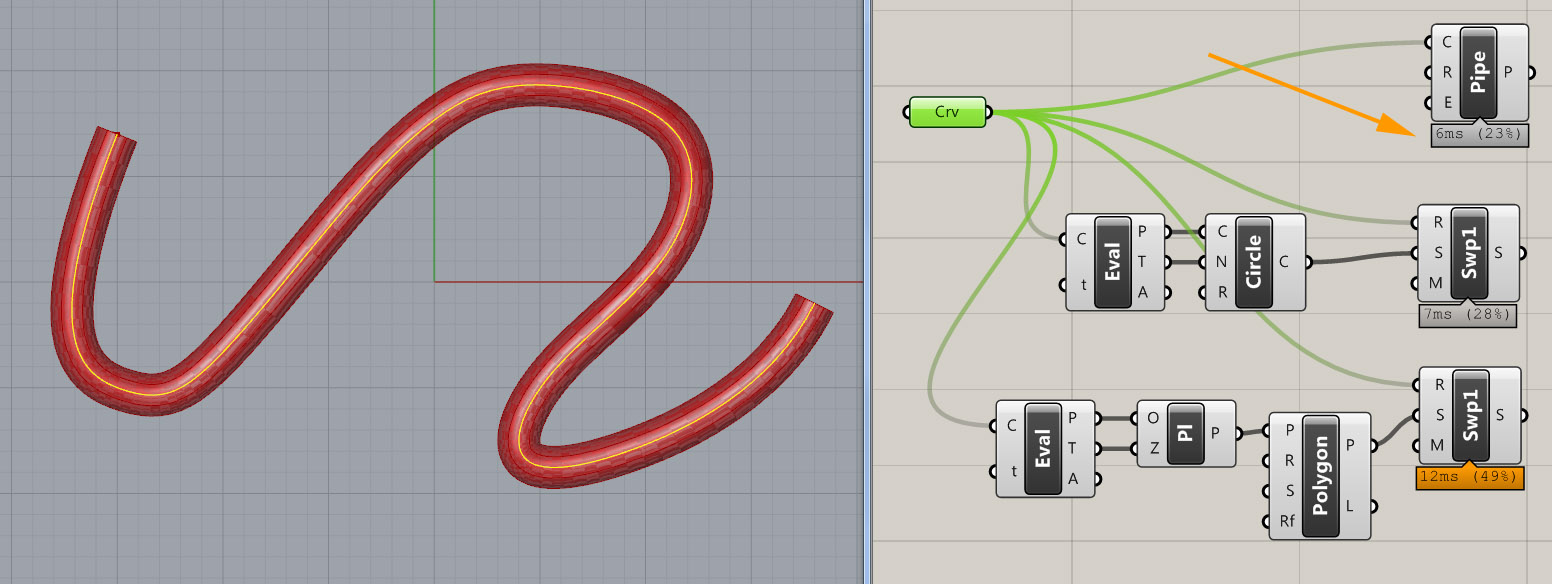
While looking at the student works of my 2009 class, I realized that in some cases, the “pipe” component takes a considerable amount of time to execute even on fast computers. Students mostly create pipes to model structural frame systems such as canopies and facade frames. Therefore, the path of the pipe is usually linear (not curved). I decided to calculate the performances of three approaches that could be used to make pipes in Grasshopper. One was the good old Pipe component, the second was a sweep component with an aligned circle, doing the same job with the pipe, and the third one was a polygon sweeping, checking if the time problem is caused by the shape of the profile. Don’t think I have plenty of spare time, I just can’t control my curiosity. The results are interesting though;
On curved paths, the pipe component is working faster than both of the sweeping methods. The results change on every curve (and for the copies of the same curve also) however the overall result is clear that pipe is the champion in this field. That was predictable of course;
However, when I tried polyline paths instead of curves to create straight pipes, the performance problem of the pipe component was revealed. Again, the results vary by the size and shape of the path, but the two sweeping methods are mostly faster than the pipe component.
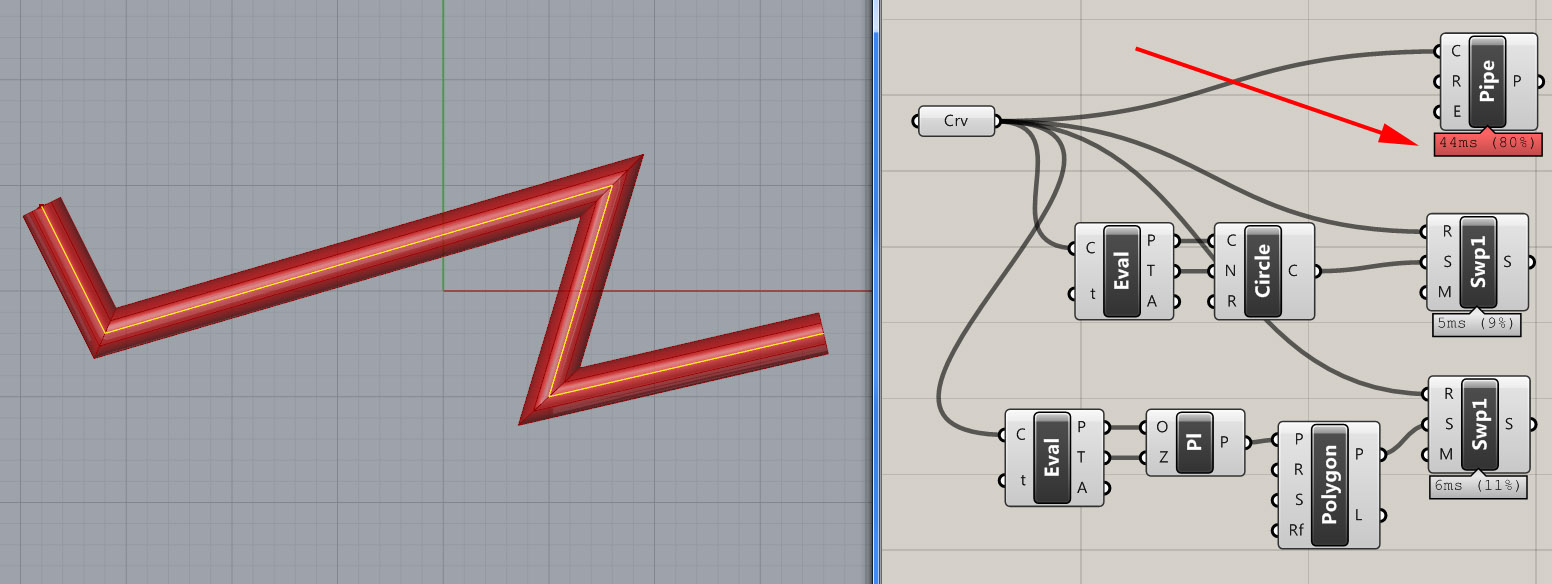
Conclusion: If you have lots of paths to create pipes, then you’ll face a performance issue with them. It is advised to use “pipe” for curved paths, but use the “sweep” components for linear ones.
Cite this post
Related Posts
Tensile Fabric with Kangaroo
September 25, 2026
How much work we did last year for first-year architectural education! The tensile fabric study we carried out using Grasshopper Kangaroo in “Design Computing”, a first-year course I coordinated alongside my colleague Serkan Uysal, served as a baseline for the material research addressed in the Basic Design studio at that time. Such geometric optimizations in Kangaroo are no longer surprising or novel to anyone. However, experiencing these tools and possibilities in architectural education in the very first year offers a…
Interlocking Structure with Boolean
August 23, 2026
You are seeing the last of the interlocking system trials that I have previously tested in two exercises. If you remember, in our first trial, we were drawing interlocking joinery details on cross-sections using closed curves, without any solid modeling. And here is the most advanced one, I guess. In this exercise, however, we are creating a solid model that incorporates these interlocking details. This time, we will look at how to construct the same system using Boolean operations. Boolean…
Slope Map on Terrains
August 18, 2026
I previously shared the Grasshopper definition for terrain generation that we used in last year’s studio midterm. One of the goals of this project was to take the first step toward developing students’ skills in understanding, processing, and utilizing terrain data as a design input. To support this objective, we provided them with small supplementary tools. One of these tools was the slope map. As you can see, this is quite a simple Grasshopper definition. It computes the slope of…
Terrain Generator
August 13, 2026
Last year, for the midterm assignment in our first-year basic design studio, we gave our students a range of different, randomly generated contexts to work with. For this purpose, I developed a small Grasshopper tool that makes the graph of a function look as much like a terrain model as possible. This tool is not really a procedural terrain generator. I would genuinely like to build one, someday. What we have here is simply a function surface. At the inputs,…
Wave Generator
April 17, 2024
Here is a wave generator code I developed using Grasshopper and Python. While searching for a solution to the realistic water simulations, I came up with the Gerstner Waves. I tried to implement it. However, I came up with this final result, which is not a Gerstner Wave generator, but a much simpler one. It combines many user-fed wave components and calculates the resulting single wave. I played with this code for hours with different components. So, it is worth…