
Inverse Kinematics in Rhino Python
This is a simple inverse kinematics solution developed by Andreas Aristidou and Joan Lasenby in 2011. They call it Forwards and Backwards Reaching Inverse Kinematics (FABRIK in short). It was quite interesting the learn this technique because it is a fast and accurate approximation of a kinematic chain. There are very interesting potentials of this technique in terms of architectural simulations. I tried to develop a Rhino Python script in Rhino 6. It seems to be working properly. Here is the simple explanation of the FABRIK method:
The Process of FABRIK’s Inverse Kinematics
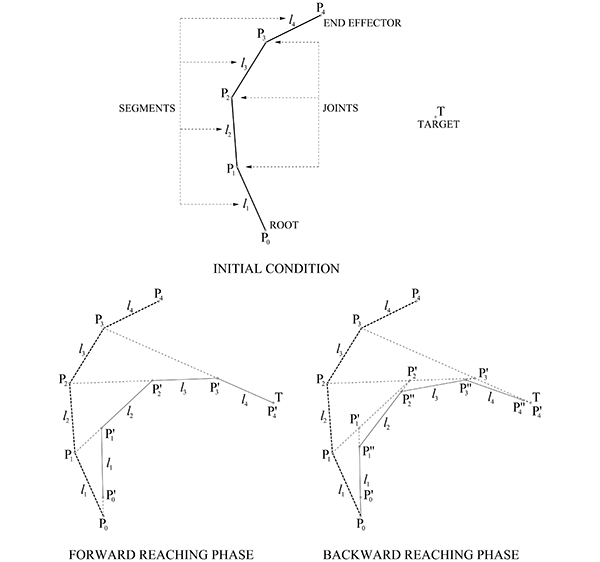
The algorithm of FABRIK requires geometers to define an initial condition. We will use an arbitrary set of joints, root, an end-effector, and a target point to explain the process. The algorithm has two major phases; a forward phase, and a backward phase. These phases include iterative modification of the joints. The forward phase starts at the end effector of the chain and works forwards, adjusting each joint one by one. Pn is relocated on T, redrawing the link ln between Pn and Pn-1, while keeping the length of this link unchanged. This phase finishes by relocating all vertices including the root, P0 temporarily defining P′0.
After the first phase, the algorithm works backward in the same way, relocating P′0 to P0 back again. These two phases complete one full iteration. After every iteration, the end-effector Pn gets closer to T. The iteration stops when the end-effector reaches the target position, or the error is sufficiently small. Notice that there can be conditions in which it is not possible to reach a perfect solution.
The Code in Rhino Python
First, the script asks a user some basic setup information such as the number of joints and their 2d locations on the plane. The last joint is regarded as the end-effector similar to the concept in robotics. Then, the user enters a goal point. The script calculates the rotations of the joints to reach the goal point. The user can control the accuracy of the solution. However, in the current version, the script gives up after 10 iterations because in some cases it would be impossible for the manipulator to reach the goal point.
Here is the code if you want to try:
import rhinoscriptsyntax as rs
joints = []
legs = []
legsl = []
jNr = rs.GetInteger("Enter the number of joints:",4,2,8)
for i in range(0, jNr):
	joints.append(rs.GetPoint("Locate joint nr."+str(i)))
rs.AddPoints(joints)
goal = rs.GetPoint("Locate the goal")
rs.AddPoint(goal)
precision = rs.GetReal("Enter the precision:",0.1,0.001,1)
arm = rs.AddPolyline(joints)
base = joints[0]
legsl = rs.ExplodeCurves(arm, True)
for l in legsl: legs.append(rs.CurveLength(l))
joints.insert(jNr, goal)
legs.append(0)
error = rs.Distance(goal, joints[jNr-1])
def chain(ch, lh, i):
	while i > 0:
		temp1 = rs.AddLine(ch[i], ch[i-1])
		if lh[i-1] > 0: temp2 = rs.EvaluateCurve(temp1, lh[i-1])
		if lh[i-1] == 0: temp2 = ch[i]
		ch[i-1] = temp2
		rs.DeleteObject(temp1)
		i = i - 1
	return ch
iteration = 0
while error > precision:
	chain(joints, legs, jNr)
	del joints[jNr]
	joints.reverse()
	joints.insert(jNr, base)
	del legs[jNr-1]
	legs.reverse()
	legs.insert(jNr-1,0)
	chain(joints, legs, jNr)
	rs.AddPolyline(joints)
	del joints[jNr]
	joints.reverse()
	joints.insert(jNr, goal)
	del legs[jNr-1]
	legs.reverse()
	legs.insert(jNr-1,0)
	error = rs.Distance(goal, joints[jNr-1])
	iteration = iteration + 1
	print "iteration #"+str(iteration)+": Error="+str(error)
	if iteration > 10: break  # Safety exit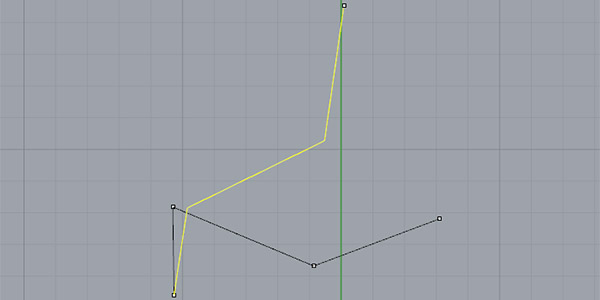
I loved the elegance, accuracy, and simplicity of this method. I would like to try to improve this code and develop 3d calculations and multiple end-effector and multiple-base versions.
Cite this post
Related Posts
RHWC of Convex Polyhedra
September 12, 2026
Hot-wire cutting (HWC) is a cost-effective subtractive fabrication technique used across many industries. The basic idea of HWC is to cut a block of material by melting it with a resistance-heated wire under tension. It is effective for materials with low melting temperatures, such as expanded polystyrene (EPS) and extruded polystyrene (XPS). Generally, HWC is associated with mold production in the architecture, engineering, and construction (AEC) industries. Robotic hot-wire cutting (RHWC) is a subtopic of HWC. In a standard RHWC…
Parametric Tool Designer for KUKA PRC
August 7, 2024
In architectural research, a significant challenge in robotic fabrication is replicating setups due to the unique configurations used in each study. There is a lack of a unified software platform connecting various researchers and their robotic setups. Additionally, the fabrication tools are typically not open-source and may not be versatile across different scenarios. I suggest using Grasshopper’s parametric modeling capabilities to address these challenges to create flexible robotic tools. Specifically, I’ve developed a definition that allows the design of tools….
Fermat’s Nightmare
October 14, 2026
Revisiting a specific mathematical phenomenon that I previously explored twice, here (in 2017) and here (in 2011), from a different angle in 2026 now. This was the final video (from 2023) that I found in my junk folder during the blog’s resurrection. Today, designers mostly know Fermat through the famous 137.5-degree angle of rotation, which is the mathematical formula used to describe the arrangement of sunflower seeds. However, today I will speculate on a nightmare of Fermat’s. Because Fermat, in…
Generating Harmonic Motion
September 21, 2026
While trying to program the curves produced by Spirograph toys in Grasshopper, I took a slightly different path. The topic eventually led to a broader heading: harmonic motion, and from there, to the Fourier Series we looked at previously. This simple Python code models Fourier Synthesis, driven by circles of different radii in a very straightforward way. The Python component sets up a loop that calculates the effect of each circle to the x and y values, individually. In this…
Flow Map on Terrains
September 11, 2026
We previously looked at the terrain generator script we used in midterm projects with first-year architecture students over here. Later on, we added a few analysis modules to this tool. You might remember the slope analysis tool from this link. Today’s topic is another type of analysis: flow. The idea for this code wasn’t actually mine; I developed it by looking at an existing script based on Serkan Uysal’s suggestion. Unfortunately, I don’t know who originally wrote it. Keeping track…