
Delaunay Triangulation with Rhino Python
Boris Nikolayevich Delaunay was a Russian mathematician and mountain climber. He developed the Delaunay triangulation, which is a method in computational geometry. It is a triangulation of a set of points such that no point is inside the circumcircle of any triangle formed by the points. It’s widely used in computer graphics and mesh generation. In 2013, I made the brute force code in Rhino Python which is a slow solution to this problem. It used to be a nice computational geometry exercise before it became widely available and popular. Still, I frequently revisit and update this cute code. The latest version handles an animated construction while keeping the test circles. I made it even slower to clearly show the process. Also, there are some tips about drawing order in Rhino Python.
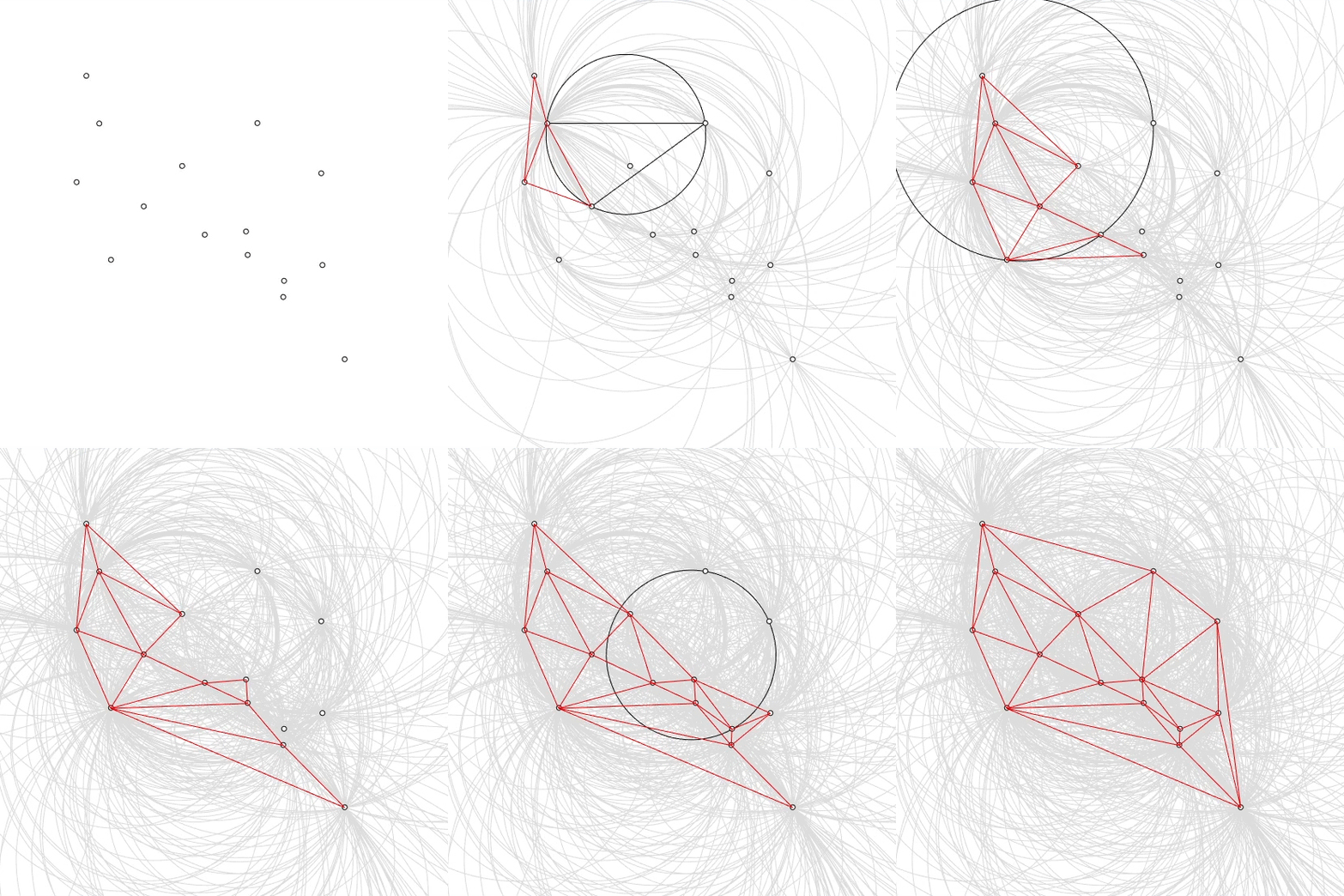
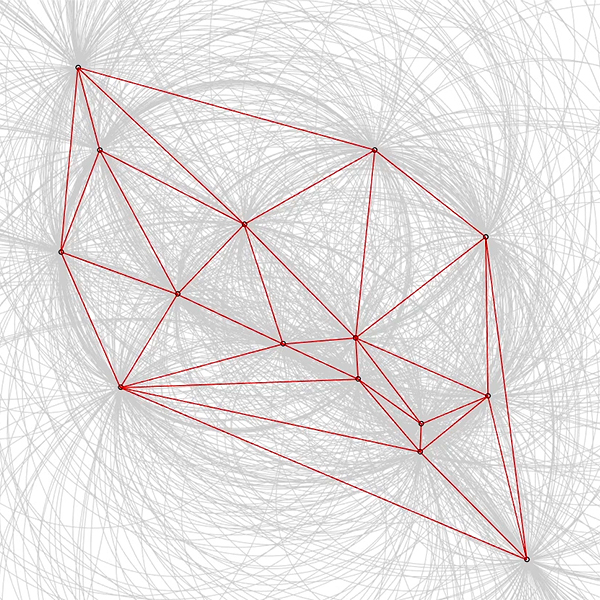
This Rhino Python code calculates the Delaunay Triangulation of any given point set in 2D. The input of the tool is the set of points. Just run the EditPythonScript command and Open the py file. Since this tool is for educational purposes, I advise you to keep the number of points at a minimum (10-15 for example). The outputs are a series of closed polylines. The code uses native Rhino Python libraries. Thus, no add-ons are necessary for it to work.
import rhinoscriptsyntax as rs
from itertools import combinations as cb
from scriptcontext import doc
points = rs.GetObjects("Select points", 1)
set = list(cb(points,3))
for tuple in set:
	c1 = rs.PointCoordinates(tuple[0])
	c2 = rs.PointCoordinates(tuple[1])
	c3 = rs.PointCoordinates(tuple[2])
	if (c1[0]-c2[0])*(c3[1]-c2[1])-(c1[1]-c2[1])*(c3[0]-c2[0]) != 0:
		circle = rs.AddCircle3Pt(tuple[0],tuple[1],tuple[2])
		triangle = rs.AddPolyline([tuple[0],tuple[1],tuple[2],tuple[0]])
		rs.Redraw()
		delaunay = 0
		for point in points:
			if rs.PointInPlanarClosedCurve(point,circle) == 1:
				delaunay = 1
				rs.DeleteObject(triangle)
				continue
		rs.ObjectColor(circle,(220,220,220))
		obj = doc.Objects.Find(circle)
		obj.Attributes.DisplayOrder = -1
		obj.CommitChanges()
		if delaunay == 0:
			della = rs.AddPolyline([tuple[0],tuple[1],tuple[2],tuple[0]])
			rs.ObjectColor(della,(255,0,0))
			obj = doc.Objects.Find(della)
			obj.Attributes.DisplayOrder = 1
			obj.Attributes.PlotWeight = 20
			obj.CommitChanges()
		doc.Views.Redraw()
Cite this post
Related Posts
Convex Hull with Rhino Python
July 28, 2017
This Rhino Python code calculates the cross-product determinant used to determine the orientation of three points (current, next_point, and point) to see if they form a left turn or a right turn. This is a well-known technique in computational geometry to check the relative orientation of points. In this script, the direction is the cross-product determinant that determines the relative orientation of the points. If the result is negative, the point is to the right of the line from current…
Delaunay Triangulation on Surface
March 26, 2015
This is a useful tip both to solve some of the problems with custom surface subdivisions, and to explain the uses of parametric surface evaluations (the U, V, W thing) and the practical use of data lists. Step 1: Put your points inside 0,0,0 and 1,1,0 so that the resulting coordinates can easily be converted to U and Vs. In the example, we are putting some random points between 0,0 and 1,1 using the Populate2d component. Step 2: Then make whatever you…
Landscape Extensions Final: Digital Sketch
February 1, 2015
This is the final Grasshopper sketch of our graduate studio conducted together with Fulya Akipek at Yıldız Technical University Computational Design Unit. The project was about designing parametric “Landscape Extensions” at Kabataş Park in İstanbul. I hope I’ll be able to post the actual student works and the material system, but now; only the final result of the digital sketch we’ve developed together with students is presented here. This was a kind of “sketchy” definition that came up as an…
Delaunay Exercise
June 28, 2013
After becoming a ready-made component in Grasshopper, the Delaunay triangulation lost its popularity quickly. It used to be a nice problem of computational geometry for designers obsessed with scripting. Last month, Benay reminded me of the method of circle checking. She showed her Rhinoscript that creates circles from point triplets and checks if a point is inside or not. Today I studied this in Grasshopper to see if I can handle the required point combinations quickly. However, my first attempt…
Curvature Map on Terrains
September 17, 2026
This is the last of the site analysis tools we previously used in the midterm project of first-year architecture education. As you may recall, we previously introduced a tool that generates topographies based on specific parameters. Afterward, we examined two tools that perform slope and flow analyses on these topographies. Today, we are presenting a tool that analyzes curvature. This topic actually constitutes one of the interesting intersection points between architectural design and differential geometry. Curvature is not something architects…