
Convex Hull with Rhino Python
This Rhino Python code calculates the cross-product determinant used to determine the orientation of three points (current, next_point, and point) to see if they form a left turn or a right turn. This is a well-known technique in computational geometry to check the relative orientation of points. In this script, the direction is the cross-product determinant that determines the relative orientation of the points. If the result is negative, the point is to the right of the line from current to next_point, indicating a clockwise turn. On the other hand, if the result is positive, this means they are counter-clockwise. If the result is zero, this means the points are collinear. Therefore, the algorithm correctly identifies the points that form the convex hull by wrapping around the set of points.
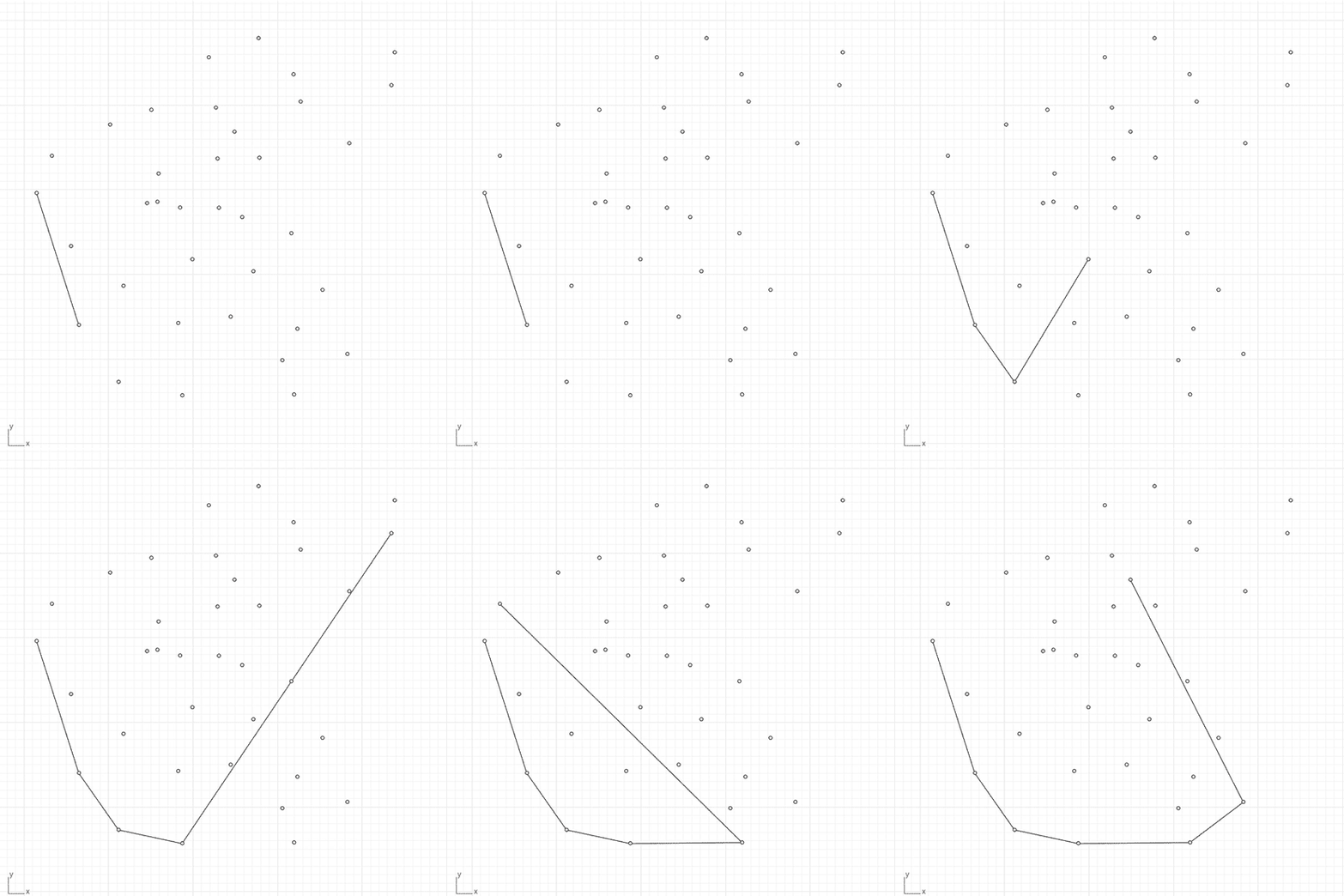
The Convex Hull Generator for Rhino is a tool designed to create convex hulls from selected point clouds. It uses the gift-wrapping algorithm (Jarvis March). Thus, users can select points within Rhino, and the script will calculate and draw the convex boundary by connecting the outermost points. It is educational for those who want to understand the cross-product.
import rhinoscriptsyntax as rs
def convex_hull(points):
	start = min(points, key=lambda p: p[0])
	hull = [start]
	current = start
	while True:
		next_point = points[0]
		for point in points:
			if point == current:
				continue
			direction = (next_point[0] - current[0]) * (point[1] - current[1]) - (next_point[1] - current[1]) * (point[0] - current[0])
			if direction < 0 or next_point == current:
				next_point = point
		if next_point == start:
			break
		else:
			hull.append(next_point)
			current = next_point
	return hull
points = rs.GetPointCoordinates("Select points")
if points:
	hull = convex_hull(points)
	for i in range(len(hull)):
		rs.AddLine(hull[i], hull[(i + 1) % len(hull)])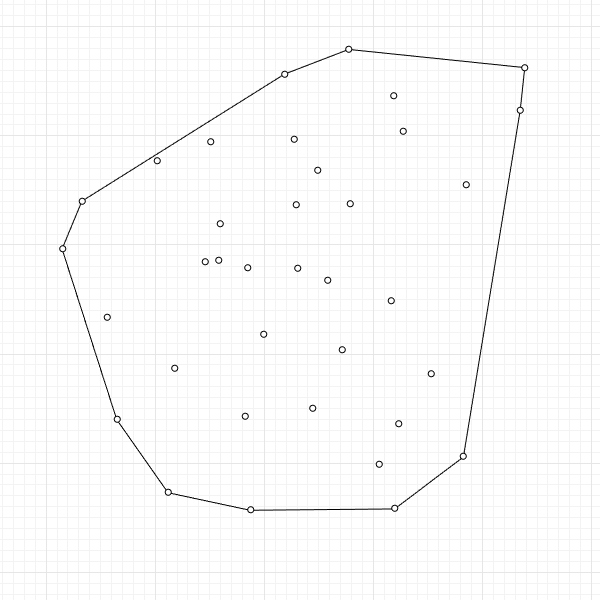
Cite this post
Related Posts
Delaunay Triangulation with Rhino Python
July 27, 2017
Boris Nikolayevich Delaunay was a Russian mathematician and mountain climber. He developed the Delaunay triangulation, which is a method in computational geometry. It is a triangulation of a set of points such that no point is inside the circumcircle of any triangle formed by the points. It’s widely used in computer graphics and mesh generation. In 2013, I made the brute force code in Rhino Python which is a slow solution to this problem. It used to be a nice…
Curvature Map on Terrains
September 17, 2026
This is the last of the site analysis tools we previously used in the midterm project of first-year architecture education. As you may recall, we previously introduced a tool that generates topographies based on specific parameters. Afterward, we examined two tools that perform slope and flow analyses on these topographies. Today, we are presenting a tool that analyzes curvature. This topic actually constitutes one of the interesting intersection points between architectural design and differential geometry. Curvature is not something architects…
Polar Sorting
September 13, 2026
I’d like to write down an interesting problem here. I remembered this while thinking about this post. It represents one of my favorite, simple pieces of reasoning. I frequently find myself needing to sort a number of points around a center in Grasshopper. Don’t ask why. I realized I’ve been using three different methods to achieve this. The first one that comes to mind is using the Vector Angle component, naturally. All we have to do is supply a plane…
Detecting Closed Shapes
August 26, 2013
Again, I continue with some simple solutions for Grasshopper. The surface split component gives all possible surfaces sliced with given curves. And it creates “invalid” curves with at least one open edge. I used this to perceive the closed regions within a given complex curve set. Just put the “Clean” component to erase the outer invalid surfaces and there remain the closed ones. However this time the question was where to put the circle and what its radius of it…
Detecting Inner Regions in Grasshopper
August 26, 2013
This is a simple trick that shows the utilization of the “surface split” component in Grasshopper. It is used for detecting the inner regions of any given two-dimensional linework. Thus, it resembles the hatch boundary detection of AutoCAD and similar software. There is no built-in hatch component in Grasshopper. But maybe you can use this as a starting point if you want to develop it. The definition starts with drawing a circle around a point large enough. The size of…