
Clustering
The famous “Deutsch limit” says, “you cannot have more than -say a hundred- components in a visual programming environment, that is why you cannot write an operating system with it.”; so it says, the perceptual and pedagogical advantages of visual programming are limited according to the size of your screen. However, there are two main oppositions to this argument. One of them says “textual programming environments have the same limitation, as you cannot have more than x lines of code on a screen, just scroll down or “pan the canvas” idiot?”. The other one says “even extreme modularity can be achieved in a visual environment just as effective as in textual representation, just make clusters as you write subs in coding, …?”. Since I started working with Grasshopper, I never needed clustering, however, it is an old and effective technique for reducing the visual (not computational) complexity of your definitions. I implemented Sivam Krish’s beautiful explanation (here) to one of my old definitions, the custom Voronoi study:
You can read that post here on how to create custom and variable Voronoi subdivisions.
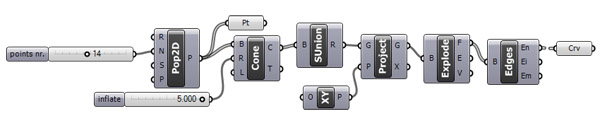
First, I placed input and output cluster components placed under “params/utils” and replaced the input and outputs of my Voronoi method. In my case, there are two inputs (points and a double number) and one output (the curves).
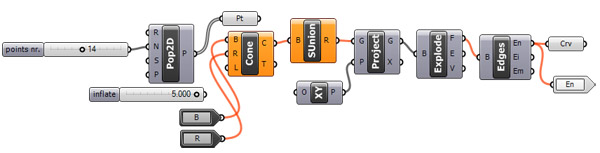
Now, just select them all and hit “edit/cluster” from the menu.
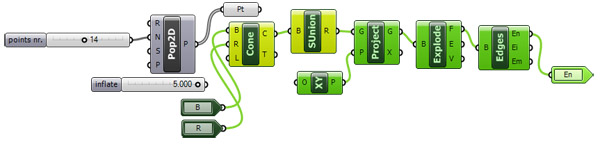
It is a clean-tidy cluster now. However, you still have to be careful about not exhausting your computer’s resources. As the “pure” dataflow approach originated as hardware research, these could also be used to distribute different parts of the code to your computer’s CPU cores. However I do not have any information about how Grasshopper handles these streams, I think it just “simulates” a concurrent execution of dataflow graphs, (expecting nothing more now).
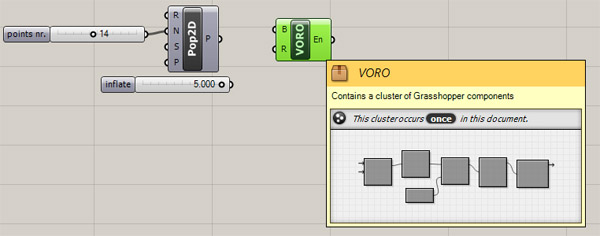
Anyway, you should re-connect your inputs to this cluster to see it working again. In my case, I have to connect those two inputs again to my points and slider. You can edit the appearance, define an icon, assign a password, and export it to a ghuser file… etc. by right-clicking on it. This is very exciting. Just double-click on the cluster to open it in a “block editor” fashion, indicated by this icon of “box”;
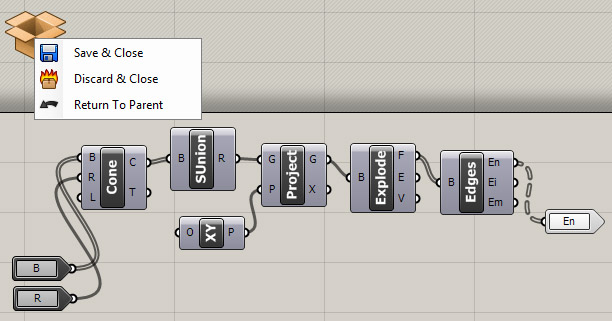
If you modify your cluster, this updates all copies in your Grasshopper definition. I still wonder if it also optimizes your CPU usage. I’ll test that later.
Cite this post
Related Posts
Excel Outputs in Grasshopper
May 22, 2012
Basic Design Studio at Bilgi University is coming to semester’s big final. Nowadays, students are trying to build their final projects. Oğuz and Gupse’s group has a truss structure with nearly 800 segments. They attempt to build it by taking length values from their own Rhino model by hand. And this itself had brought a difficulty, because one person of the group should be assigned only to do this measurement, reducing their workforce. They asked me if there is an…
Smooth Sketch Data Recorder
February 29, 2012
Here is a funny sketching system for the “SPEC” homework. Four (or more) points are created using 2d sliders (MD slider) and decomposed these points into x,y and z numbers. Then, they are re-populated in 3d points by changing their plane. X coordinates are connected into Y, and Y coordinates are connected to Z’s. Tricky part comes then, the X number is defined by a serie of numbers started from 0 to 30 by 1. After that, polylines are constructed using…
Data Recorder and Surfaces
February 7, 2012
In this experiment, I’m trying to use data recorder to change components on a surface. The component part is a standart triangular construction, but the attractor points are defined by a 2D slider that is connected to a data recorder. Data recorder remembers last 15 points, while you move the 2d slider, last 15 points are projected on the base surface. This creates an illusion as if a “snake” game on a surface. Definition then uses the closes point distance…
Data Domains in Grasshopper
March 24, 2024
In this short tutorial, I am showing the essentials of data domains in Grasshopper. A domain is a data type in Grasshopper that represents a portion of the 1d or 2d number space. This requires a starting and ending point in those spaces. In 1d, these points are two numbers. Then, the domain represents all the numbers between them. In 2d, a data domain is represented by two coordinates (u, v). This presentation illustrates this concept with the area defined…
Data Structures in Grasshopper
June 8, 2023
Data structures and data matching principles are important to be able to design with Grasshopper. In this tutorial, I show data matching procedures with arithmetic operations. Then I repeat them in the production of geometric objects. I think it should be easier to use this programming language once the students understand the basic principles. Therefore it would be easier to design with it. Sometimes the design process of these diagrams proceeds from left to right (by induction) but sometimes it…