
Circular Relationship Diagram
This is done because I needed to represent relationships between different factors and layers of a design process. Although this method of “Chord Diagrams” is a very common technique in information design, it became very hard to find an effective tool for generating those diagrams quickly. There seem to be a solution called “Circos” but however, even installing it on the computer became very boring for me. So I decided to make a Grasshopper definition that generates simple circular relationship diagrams. The resulting Grasshopper definition seems to be a bit complex for such as simple task, but my intention is to study it further.
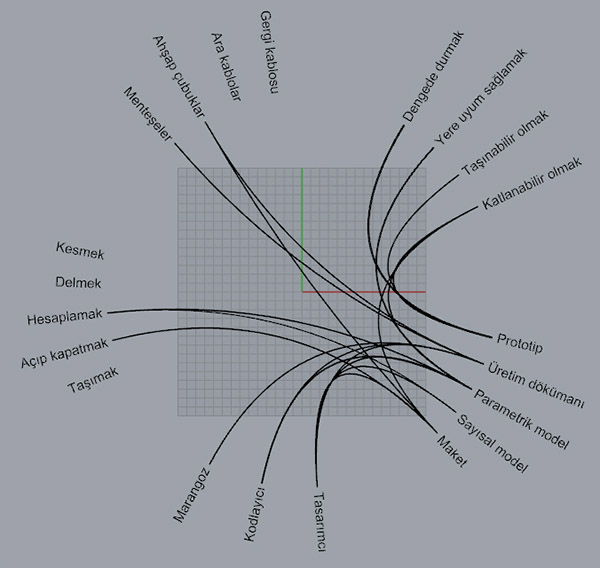
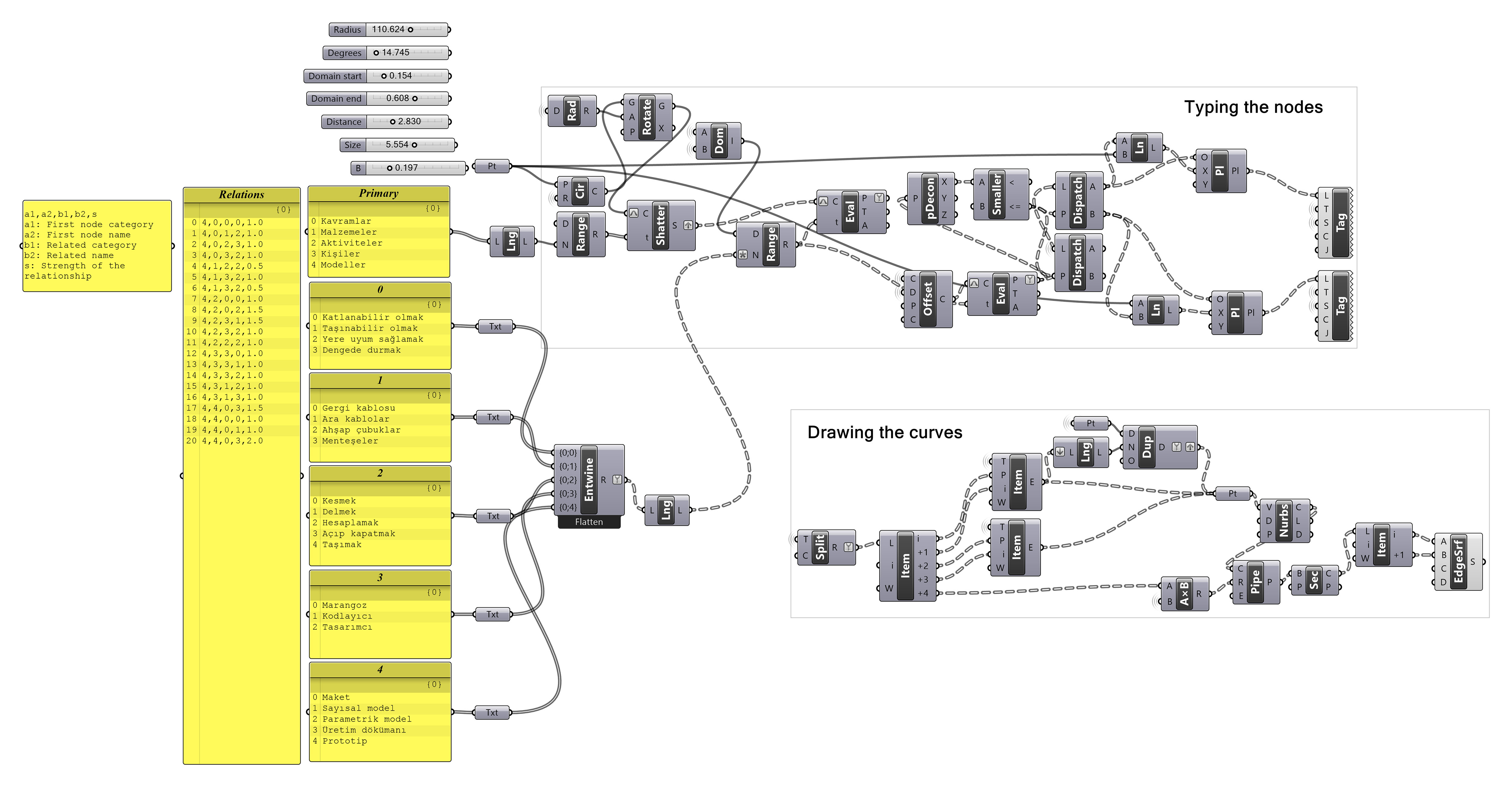
I didn’t visit grasshopper groups recently to see if there is a special component group for such visualization tasks. Anyway, this is a good idea to do because although Grasshopper is very capable of handling parametric relationships, it lacks representation and visualization.
Cite this post
Related Posts
Curvature Map on Terrains
September 17, 2026
This is the last of the site analysis tools we previously used in the midterm project of first-year architecture education. As you may recall, we previously introduced a tool that generates topographies based on specific parameters. Afterward, we examined two tools that perform slope and flow analyses on these topographies. Today, we are presenting a tool that analyzes curvature. This topic actually constitutes one of the interesting intersection points between architectural design and differential geometry. Curvature is not something architects…
Flow Map on Terrains
September 11, 2026
We previously looked at the terrain generator script we used in midterm projects with first-year architecture students over here. Later on, we added a few analysis modules to this tool. You might remember the slope analysis tool from this link. Today’s topic is another type of analysis: flow. The idea for this code wasn’t actually mine; I developed it by looking at an existing script based on Serkan Uysal’s suggestion. Unfortunately, I don’t know who originally wrote it. Keeping track…
Designcoding WordPress Theme
August 14, 2026
Designcoding is a lightweight, content-focused WordPress theme built around simplicity, speed, and readability. It uses a clean desktop layout with a responsive mobile version and does not require any plugins, page builders, external frameworks, or third-party services. The theme has been tested with LocalWP on a clean WordPress installation and works as intended. The theme includes several built-in content discovery features. Explore uses tags to help visitors discover related topics, while individual posts can automatically display up to five Related…
Fibonacci Portraits
December 27, 2023
“In the heart of a sunflower’s embrace, its seeds weave a poetic tale—a dance of two spirals, parastichies they’re called. One unfurls gracefully from the center in the hush of clockwise whispers, while its counterpart whispers secrets in the tender breaths of counterclockwise motion. A subtle ballet unfolds, where the number of these spirals gracefully mirrors the whispers of adjacent Fibonacci numbers, composing a delicate symphony in the sun-kissed fields.” says ChatGPT if I force it to be a little…
Rhino Viewport Colors
August 8, 2023
Recently I found this VB.net component in an old Grasshopper project. I am not sure if it is mine or not, but I wanted to share it with you. This code modifies Rhino viewport colors quickly without entering the Rhino options window. I frequently modify the viewport colors and grid settings to create renders or animations within Grasshopper. This is why, this component might be useful in making quick modifications to the screen colors. Here is the VB.net code inside…