
Attractor Basics
In this short tutorial, I want to give Grasshopper beginners the basics of how we create attractor systems. The Grasshopper definition you see in the below figure is the equivalent of array-type copying operations in CAD. However, unlike in CAD programs, here we are dealing with multiple generations of objects rather than transformations.
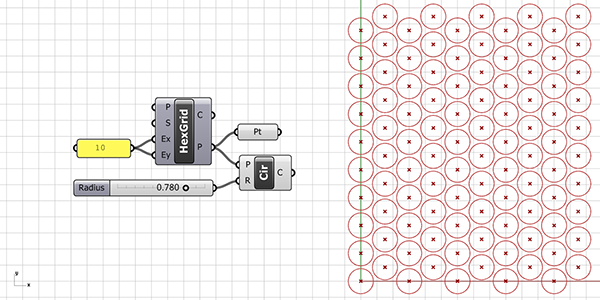
Attractor Basics: Data Matching
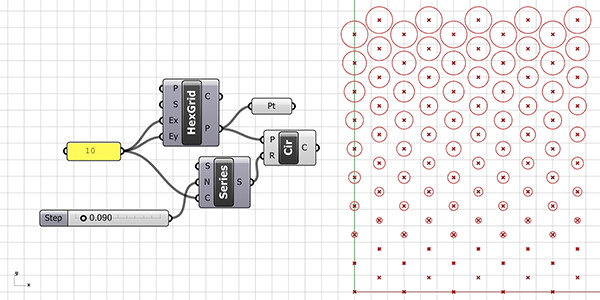
In the application you see in the figure below, each row of the hexagonal grid created with HexGrid has a different radius value. How did this happen? We can place a Panel component and control the output parameters. We can see that the hexagonal grid’s P output provides a data tree with 10 branches and 10 points in each branch. This time, instead of a single radius value for the circles, we generated 10 radius values with the help of the Series component.
We can see these values by connecting the Series’ S output to a Panel. We combine this series with a Circle (Cir) component that centers the grid points. Thus, we visualized how Hexagonal (HexGrid) creates a data tree. The points coming out of the Hexagonal (HexGrid) component first create points arranged upwards, and after a column is completed, these columns are duplicated to the right (assuming we are looking from a top view).
When each branch of the data tree is matched one-to-one with our radius list, the radii start increasing from the bottom-left circle. After matching the 10th circle on the top left with the 10th radius in the series, the next branch continues with the bottom point of the second column on the left. This is again a 10-element data list and will be matched with the radius values in the same order from the beginning. You can observe this process by changing the Ex input of the hexagonal grid to 1 and then 2. No matter how much we explain, sometimes it can be difficult to understand just by reading. You should actually do the application yourself.
Point Attractor Basics
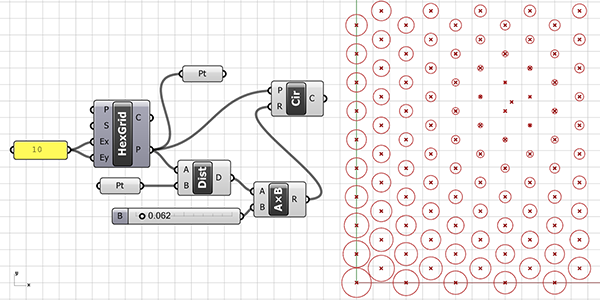
In the below figure, we incorporate attractors to make our circles behave differently. For this, you need to include a point in Rhino referenced into the Pt parameter. Or define a point within Grasshopper using the methods you already know and connect it here. Then, we calculate the distances from this attractor point to all other points of the grid using the Distance (Dist) component. After that, we use the Multiplication (AxB) component to proportionally reduce the distance values. We do this by multiplying them with a small number greater than zero. If this reduction process is not applied and the output D of the Distance (Dist) is directly connected to the R input of the Circle (Cir), each distance value will be equal to a radius value, resulting in all circles tangentially touching your attractor point. If you’re ready, we recommend trying it once.
The point on a Curve
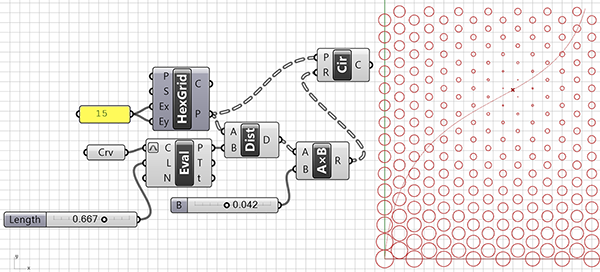
In the below figure, we made the attractor basics a bit more dynamic. This time, we use a point that we can move along a curved path as the attractor point. When you drag the Number Slider connected to Evaluate Length (Eval), you create a point moving along the curve. Later in the application, we used this point in the same way as before. One advantage of using the Number Slider is that it can provide the generated variations in a dynamic way, and it also allows you to create small animations through the Animate option. For this application to work, we must enter a curve into the Curve (Crv) data input. You can use the reference curve we explained how to draw in the previous section for this purpose.
Curve Attractor Basics
In the alternative we show in the below figure, we did the same design. But with a curved attractor area instead of a point-based one. The only difference in this shape is that we calculated the distances. Then we processed it as the closest distance between the grid and a curve, rather than the grid and a point. The component used for this is Curve Closest Point (Crv CP). When it comes to diversifying shapes drawn on the grid, Grasshopper offers many different options. For example, it is possible to obtain the radius information of the circles not based on the distances between them and another geometric object. We can use any kind of numerical data we can obtain as the radius parameter.
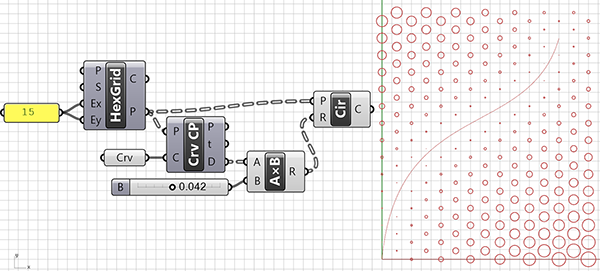
I hope this explanation of attractor basics would be useful for those who are learning Grasshopper. Here are all the Grasshopper files in this post:
Cite this post
Related Posts
Circle Crossing
December 25, 2011
I am learning Grasshopper. In this Circle Crossing definition, I tried to create the above pattern (also described in Sunflower Spiral) as simply as possible, this definition creates not only spirals but is also capable of more tessellations I guess. Maybe a three-dimensional equivalent might be studied in the future. As you can see from the definition, I started with a large circle. Then, I divided it into segments and placed new circles centered on them. Finally, I divide the…
Field Deformation
October 8, 2026
Ever since I restructured designcoding, I’m still sorting through the trash folder. All 580 posts published on the blog have been reviewed, and their files have been uploaded as open source. The mysterious trash folder, where I couldn’t even tell where things belonged, is shrinking fast. While checking this folder yesterday, I found a video. This is probably a simple tutorial I prepared about 10 years ago for the parametric modeling elective course (probably related to this 2012 post). The…
Basic Grid Deformation
July 5, 2023
I am still trying to find the simplest solution to some geometric definitions. This is why I called this Grasshopper definition “Basic Grid Deformation”. Here you see the Curve Proximity (CrvProx) component in use. This component calculated the shortest distance between two curves. I think the underpinnings of this component are very interesting. I hope I can code it in Python one day. In order to see the result more clearly, the Previews of the Interpolate Curve (IntCrv) and Square…
Minimal Parquet Deformations
January 28, 2013
Is it possible to model a two-way parquet deformation using only native components of Grasshopper? In this definition, I limited myself to 10 of them. Parquet deformations are a very interesting and pedagogical topic to teach some of the basics of contemporary parametric modeling. This post explains a minimal parquet deformations algorithm in Grasshopper. However, this has its own limitations. You will see that the definition generates the attractor graph curve. Because the graph input tool creates the magic here….
Point Attractors Revisited
February 29, 2012
This is the basic definition of one point attractor on a grid of points. Here, the fundamentals of data tree matching can be studied. A hexagonal grid is exploded into points and new polygons are created there. Instead of a standard point distance relation to polygon size, this time the distance factor affects the rotational angle of these polygons. Although the structure of data trees is getting complicated, this has no difficulty in such definition, because the operational complexity is still very…