
Polygon Fractals with Rhino Python
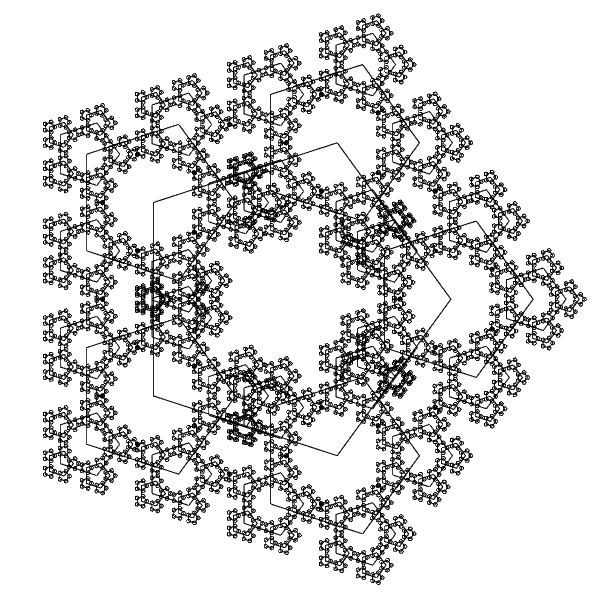
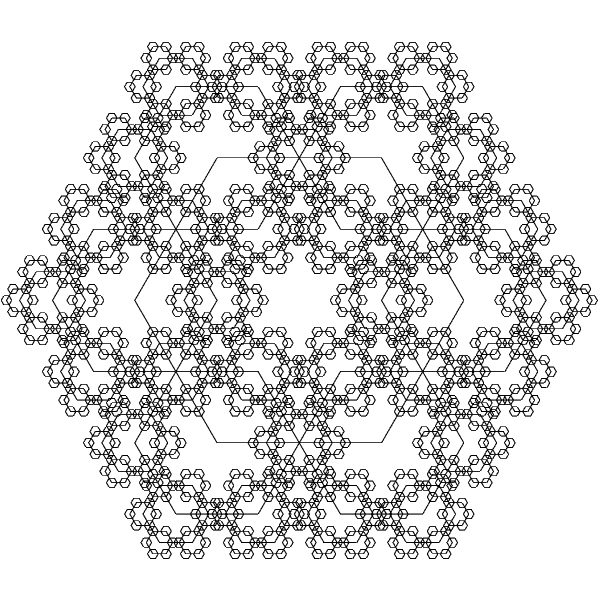
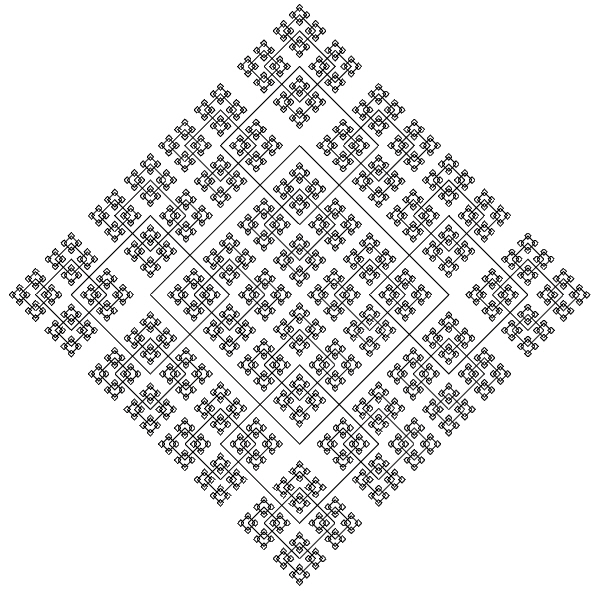
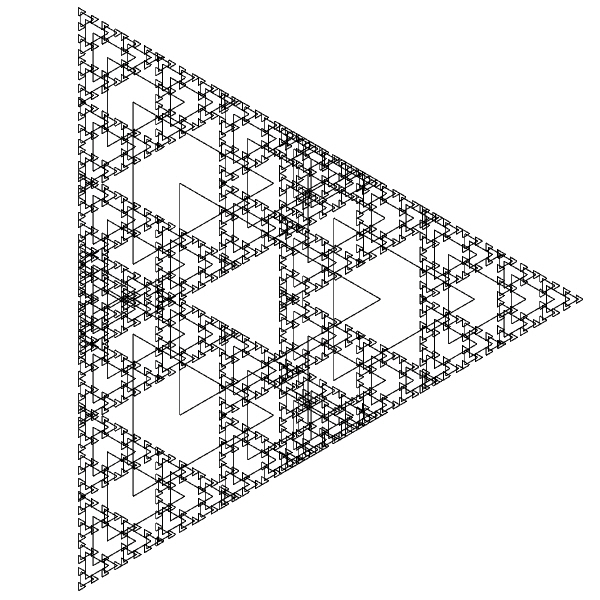
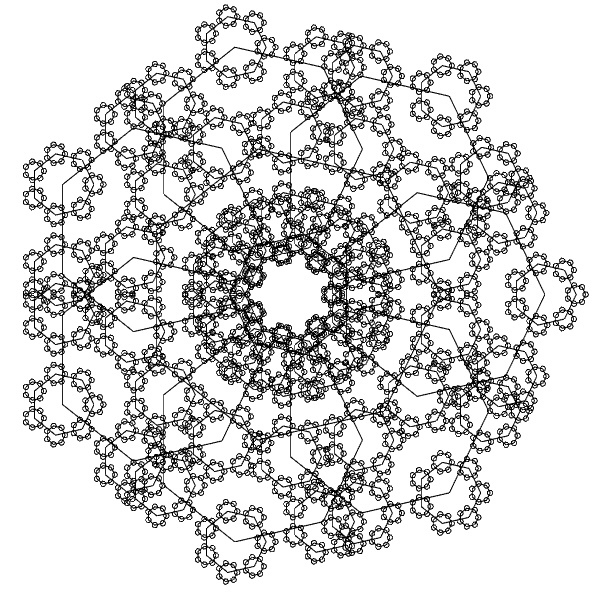
We will see a simple Rhino Python exercise here. I called these Polygon Fractals (or Pentaflakes sometimes). It is both educational and fun to play with them. In Rhino, it can be a good exercise for basic CAD commands and transformations such as move, copy, and scale, and precision drawing operations such as object snapping. Also, in Grasshopper, it can be a good challenge for looping. In Rhino Python, it is already a good exercise for understanding Python and the rhinoscriptsyntax module.
This form generation method, Polygon Fractals is based on an exercise I tried earlier in the Design Geometry course. As you can see, I repeat the selected polygon using a loop. I form new vertices at each step and carried them to the next step of the iteration. This creates a pattern that you can repeat as many times as desired. In such fractals, the geometric displacement rule is applied. It may not be correct to call these shapes that I have produced fractals. But in terms of self-similarity and diversity derived from the repetition of a simple operation, I think they could be called fractals.
# Drawing Simple Polygon Fractals
# 02.08.2017 www.designcoding.net - Tugrul Yazar
import rhinoscriptsyntax as rs
centerPoint = rs.GetPoint("Specify the center of polygon")
numberEdges = rs.GetInteger("Enter the number of edges", 6, 3)
radius = rs.GetReal("Specify the radius of polygon", 10)
iterat = rs.GetInteger("Enter the number of iterations", 3)
scale1 = rs.GetReal("Specify the first scale",0.5)
scale2 = rs.GetReal("Specify the fractal scale",0.4)
rs.EnableRedraw (False)
tempCircle = rs.AddCircle(centerPoint, radius)
pointList = rs.DivideCurve(tempCircle, numberEdges)
pointList.append(pointList[0])
rs.DeleteObject(tempCircle)
polygon = rs.AddPolyline(pointList)
nextRow = []
scale = scale1
for i in range(0, iterat):
	for x in pointList:
		vector = rs.VectorCreate(x, centerPoint)
		object = rs.CopyObject(polygon, vector)
		temp = rs.ScaleObject(object, x, [scale,scale,scale])
		prep = rs.ExplodeCurves(temp)
		for y in prep:
			nextRow.append(rs.CurveStartPoint(y))
			rs.DeleteObject(y)
	pointList = nextRow
	nextRow = []
	scale = scale * scale2
rs.EnableRedraw (True)
The Python code starts with the user inputs. Then I define the first polygon by drawing a circle and dividing it. Unfortunately, Rhino Python still doesn’t have a polygon method. Then, I define some variables like scale. After that, the for loop runs. On each iteration, I use all the points in the pointList as the center points of copied-scaled versions of the polygon. Immediately after this operation, I explode the newly created polygons. Because, in another loop, I add the vertices of the exploded polygons to a temporary list. After modifying the scale ratio this whole operation is repeated.
Cite this post
Related Posts
Sierpinski Triangle
February 20, 2024
Today’s computational curve is the beautiful Sierpinski Triangle. It is a fractal named after the Polish mathematician Waclaw Sierpinski, who described it in 1915, though it had been previously described by other mathematicians. It is a self-replicating pattern that arises from a simple recursive process. To construct the fractal, you start with an equilateral triangle and then repeatedly remove smaller equilateral triangles from its interior, leaving holes. Each iteration involves dividing each triangle into four smaller triangles and removing the…
Hilbert Curve
January 16, 2024
The Hilbert Curve, also referred to as the Hilbert space-filling curve, was initially introduced by the German mathematician David Hilbert in 1891. It is a continuous fractal curve, presenting a variation of the space-filling Peano curves uncovered by Giuseppe Peano in 1890. After a study on the mathematical background of this curve, I implemented a Python code into Grasshopper Python. However, I wanted to explore more variations by playing with the algorithm. This is why, the resulting Grasshopper definition can…
Fractal Curves with Rhino Python
July 31, 2017
A simple Rhino Python script that generates fractal curves. An example is a test with the Gosper-Peano curve. However the script is not supporting segment directions, which is why the result is not the intended curve. Curve directions could be implemented in the future.
Drawing Hexaflake
December 11, 2024
The term “hexa” generally refers to the number six, derived from the Greek word. It is commonly used in mathematics, geometry, and other scientific fields to indicate six-sided shapes or structures. A hexagon is a polygon with six sides and six angles. It is one of the regular polygons, meaning all of its sides and angles are equal. A hexahedron is a polyhedron with six faces. The most well-known example is the cube, which has six square faces, twelve edges,…
Star Lattice
May 15, 2023
This is the six-pointed star lattice definition in Grasshopper. The definition is generating CNC or laser-ready results as seen below. In this code, first, I developed a common star pattern by exploding a hexagonal grid. The tricky part of this definition is the last part. There, you can see how you can use the Region Union (RUnion) component to add thickness to a pattern we have drawn before. The operation here will require trimming and extending commands under normal conditions….