
Parametric Curve Equations
The parametric curve equations are good examples to demonstrate the bridge between computer-aided design and mathematics. Although useless and pointless, it is a good exercise to extract the curve equations. In this Rhino Python code, I present a generalized equation extractor for Rhino. Rhino curves are good examples de Casteljau and Bézier curves. You can see the mathematical underpinnings of Rhino curves with this exercise:
from math import *
import rhinoscriptsyntax as rs
p = []
f = g = h = ""
d = rs.GetInteger("Enter degree ",3,1,7)
for i in range(d + 1):
	point = rs.GetPoint("Specify control point #"+str(i + 1))
	p.append(point)
	rs.AddPoint(point)
for i in range(d + 1):
	c = factorial(d)/(factorial(i)*(factorial(d-i)))
	f += "("+str(c)+"*((1-t)**("+str(d)+"-"+str(i)+"))*(t**"+str(i)+")*"+str(p[i][0])+")+"
	g += "("+str(c)+"*((1-t)**("+str(d)+"-"+str(i)+"))*(t**"+str(i)+")*"+str(p[i][1])+")+"
	h += "("+str(c)+"*((1-t)**("+str(d)+"-"+str(i)+"))*(t**"+str(i)+")*"+str(p[i][2])+")+"
f += "0"; g += "0"; h += "0"
print("These are the three (x,y,z) parametric equations of the curve")
print("f = "+f)
print("g = "+g)
print("h = "+h)
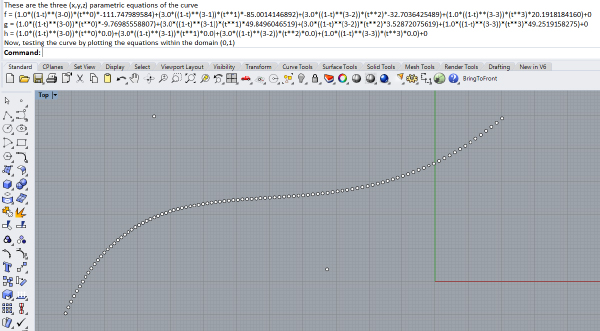
print("Now, testing the curve by plotting the equations within the domain (0,1)")
for i in range(0,100):
	t = i / 100
	point = [eval(f), eval(g), eval(h)]
	rs.AddPoint(point)
This code asks the user the degree of the curve. By default, Rhino’s curves are degree 3. Therefore, our default value is 3. After that, the script asks the user to specify the control points of the curve. The number of control points is always degree+1. More control points will require the decomposition of the curve into degree 3 spans. Maybe, I will post something about this later. After getting these data, the script starts building the equations.
The standard parametric curve has three equations; f, g, and h. These equations control the x, y, and z coordinates of the points on the curve. These equations are independent of each other, but all of them include one variable called t. This is the parameter, which is generally between 0 and 1. You need to plug the t value into these equations and calculate the x, y, and z coordinates. We build these equations as string values in the script.
Overall, we are constructing the Bernstein polynomial here. The line with “factorial” functions is called the “binomial” function. The other lines utilize the general Bernstein polynomials by plugging the coordinate values, the binomial coefficient, the degree, and other stuff. If you are interested in this part, I recommend looking at here. Finally, the script displays the three parametric curve equations and uses them to draw 100 points for verification.
Cite this post
Related Posts
Discrete Fourier Transform
May 8, 2025
The Fourier Transform is a powerful mathematical technique that allows us to analyze the different frequency components within a signal or shape. Its discrete version, the Discrete Fourier Transform (DFT), is used when working with numerical data. I studied the Fourier Series here before. One of the most fascinating aspects of the DFT is that it can represent a signal or shape using rotating circles (or vectors). Each circle corresponds to a specific frequency, amplitude, and phase. When connected in…
Quick Parametric Curves
July 28, 2024
Here is the shortest possible way of generating quick parametric curves in Rhino Python. So, you may change the f, g, and h functions to test any function curve. In this Python code, the list comprehension [(f(t), g(t), h(t)) for t in [t0 + i*dt for i in range(int((t1-t0)/dt)+1)]] works by first generating a list of t values from t0 to t1 with an increment of dt using the inner comprehension. The outer comprehension then iterates over these t values,…
B-Spline Construction
January 25, 2024
I have been studying the Bezier-De Casteljau algorithm for several years. Last week, I finally managed to understand and implement B-Spline Construction in Rhino and Grasshopper Python code, using the Cox-De Boor algorithm. This algorithm calculates the effect of control points on a B-Spline with many control points. After this, I am not limited to the degree+1 control points. This animation shows both algorithms working together. This Rhino Python code in a Grasshopper definition can handle three tasks. The first…
Curve Equations Revisited
October 14, 2021
This is the continuation of the previous post on parametric curve equations. In this new version, the script picks a NURBS curve from the user. Then, it analyses the curve’s degree and control points. Unfortunately, only the curves with degree+1 number of control points can be processed. In the future, I hope that I will be able to extend this script to include multi-span curves with more than degree +1 control points. Finally, the script creates the three functions for…
Derivative and Slope
April 6, 2018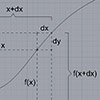
Yes, interesting topics started to reveal themselves, when I dig into the function curves, especially in the parametric representation. The first interesting application is the “derivative”. Nobody in high school told me that the derivative of a function at a given point gives the slope of the graph at that point. Moreover, it is possible to convert the slope value into an angle in degrees, showing the angle of the tangent line to the x-axis at that point. They are…