
Cubic Bézier Curve with Rhino Python
Below is the Python code you can run in Rhino, that draws a cubic Bézier curve (degree 3). As you can see, the Rhino Python code is very slow and inefficient because we calculate every point with lots of computations. Instead, we can use the spline formulae to make this quicker but I wanted to show that the mathematical construction is parallel to the geometric one. This is a nested set of linear interpolations. In fact, the linterp function in the code is the key to this method.
import rhinoscriptsyntax as rs
## Degree 3 Beizer Curve
def linterp(p1,p2,t):
	tx = p1[0] + (p2[0] - p1[0]) * t
	ty = p1[1] + (p2[1] - p1[1]) * t
	return (tx,ty,0)
p1 = (0,0,0)
p2 = (0,20,0)
p3 = (20,20,0)
p4 = (20,0,0)
t = 0
while t <= 1:
	t1 = linterp(p1,p2,t)
	t2 = linterp(p2,p3,t)
	t3 = linterp(p3,p4,t)
	t4 = linterp(t1,t2,t)
	t5 = linterp(t2,t3,t)
	t6 = linterp(t4,t5,t)
	rs.AddPoint(t6)
	t = t + 0.005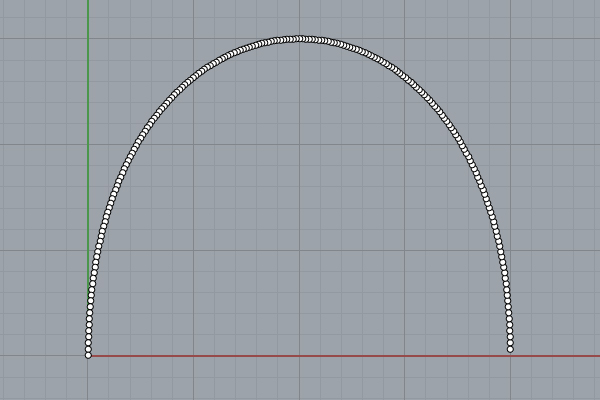
The code is a while loop, iterating a number (t) from 0 to 1 by 0.005 at each step. You can modify these initial values and see their effects. If you increase the gap between the domain (0 and 1), you will “extend” the curve. Similarly, if you decrease it, you will “trim” the curve. You can change the increment to generate more or fewer points and make it faster but less correct. Be careful not to crash by going into an infinite loop in this while block. To draw the cubic bézier curve, we need four control points. These are p1, p2, p3, and p4 in the code. The while loop calls linear interpolation at each iteration to calculate one point. The linear interpolation, in fact, is a vector addition and multiplication operation. As you can see, Rhino Python handles coordinates as vectors successfully.
In the future, I am planning to study this and similar codes more. This helps me understand the mathematics behind computer-aided design at a fundamental level.
Cite this post
Related Posts
B-Spline Construction
January 25, 2024
I have been studying the Bezier-De Casteljau algorithm for several years. Last week, I finally managed to understand and implement B-Spline Construction in Rhino and Grasshopper Python code, using the Cox-De Boor algorithm. This algorithm calculates the effect of control points on a B-Spline with many control points. After this, I am not limited to the degree+1 control points. This animation shows both algorithms working together. This Rhino Python code in a Grasshopper definition can handle three tasks. The first…
Bezier Function Extractor
December 26, 2023
Today’s curve is the beautiful Bezier curve. A series of linear interpolations between the coordinates of control points describe a Bezier curve. So, I created a simple tool in Grasshopper called Bezier Function Extractor to experiment with this elegant construction. In the linear form (degree 1) the linear interpolation between 2 points (P1 and P2). The point at parameter t (0<= t <= 1); Q = tP1 + (1-t)P2. In the second degree, we need three points (P1, P2, and…
Calculating a Guitar’s Surface Area with Bézier Curves
August 27, 2024
Below is the first paper of my son, Mete Yazar. It is about a mathematical and geometric exercise of calculating the surface area of an arbitrary shape (a classical guitar’s body panel). He did a good job in utilizing Bezier/de Casteljau curves and generating the parametric equations of the piecewise curve. I helped him to validate the results by using rhinoceros CAD software. Therefore, it seems that his calculations are correct. In this paper, we attempted to calculate a guitar’s…
The Flow Earring
January 9, 2012
I developed this code 13 years ago while learning the fundamentals of Visual Programming in Grasshopper. I was studying the ways of NURBS curve geometry. The animation shows the construction process of several Bezier Curves. In 2024, I optimized the code and added the thickness. The Flow Earring project showcases the beauty of parametric curves. The Grasshopper definition displays the animated construction process and the variations. The flow of the curve and its variations still look fascinating, reminding me of…
Fermat’s Nightmare
October 14, 2026
Revisiting a specific mathematical phenomenon that I previously explored twice, here (in 2017) and here (in 2011), from a different angle in 2026 now. This was the final video (from 2023) that I found in my junk folder during the blog’s resurrection. Today, designers mostly know Fermat through the famous 137.5-degree angle of rotation, which is the mathematical formula used to describe the arrangement of sunflower seeds. However, today I will speculate on a nightmare of Fermat’s. Because Fermat, in…