
Vector Normalization and Dot Product
This is the continuation of the Vector class we started here, and further advanced here, here, and here. This new Rhino Python implementation is mostly educational and partially a hobby. Before this session, we have developed display, magnitude, add, multiply, reverse, and subtract methods. This time, I am adding the vector normalization and dot product methods and seeing the utilizations of the dot product.
import rhinoscriptsyntax as rs
import math
class Vector:
	def __init__(self, point):
		self.components = point
	def display(self, origin=[0,0,0]):
        v = self.components
        tip = (v[0]+origin[0], v[1]+origin[1], v[2]+origin[2])
        line = rs.AddLine(origin, tip)
        rs.CurveArrows(line, 2)
	def magnitude(self):
		v = self.components
		result = v[0]**2 + v[1]**2 + v[2]**2
		return math.sqrt(result)
	def add(vA, vB):
		v1 = vA.components
		v2 = vB.components
		addition = (v1[0]+v2[0], v1[1]+v2[1], v1[2]+v2[2])
		return Vector(addition)
	def multiply(self, s):
		v = self.components
		return Vector([v[0]*s, v[1]*s, v[2]*s])
	def reverse(self):
		return self.multiply(-1)
	def subtract(vA, vB):
		return Vector.add(vA, vB.reverse())
	def normalize(self):
		return self.multiply(1/self.magnitude())
	def dot(vA, vB):
		v1 = vA.components
		v2 = vB.components
return v1[0]*v2[0] + v1[1]*v2[1] + v1[2]*v2[2]| Line | Explanation |
| 1-26 | Already explained in the previous posts. |
| 27 | Define a new method called “normalize”. |
| 28 | Call the multiply method for the given vector (self), with the scalar of 1/magnitude. This will reduce the length to 1. Imagine a vector with a length of A. Multiplying it with 1/A would result in 1. |
| 29 | Define a new class method called “dot”. This method takes two vector objects. |
| 30 | To make the code lines shorter, create a temporary variable called v1 and store the components (list of three numbers) of the first input vector. |
| 31 | Create a temporary variable called v2, and store the components (list of three numbers) of the second input vector. |
| 32 | Calculate the dot product (which is a single number) and return it to the user whenever it is called |
In the above code, I created a new method for vector normalization, called normalize(). Since we developed a vector-scalar multiplication method earlier, now we can use it to reduce (or increase) the magnitude (length) of any vector to 1 unit. Therefore, the method multiplies the given vector by 1 / its magnitude.
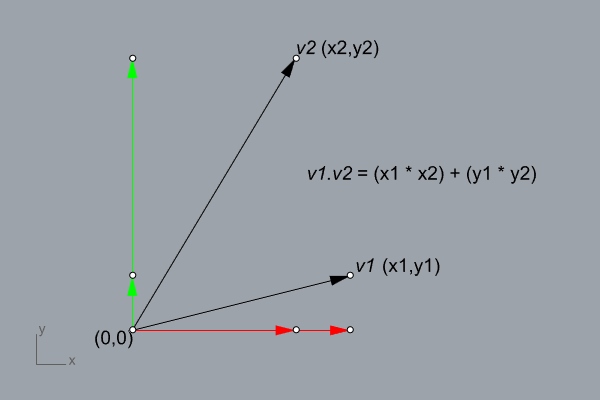
Then, I developed a simple dot product method. The above diagram shows the formula for two-dimensional vectors. Therefore, you can generalize it to n-dimensional vectors by the same formula. Finally, to have a good insight on the dot product I highly recommend watching this and this.
Cite this post
Related Posts
Vector Projection and Angle
December 21, 2021
In this session, I will add two new methods to the Vector class. I think this will finish the basics for the vectors. In the future, we are going to need several new methods like adding multiple vectors and interpolation. But for now, I think this would be sufficient to further advance into parametric curves and surfaces. These new methods will be based on the dot product method we created in the last post. I will add the vector projection…
Vector Magnitude Method in Rhino Python
October 12, 2021Today, I am going to make only one addition to the Vector class we recently started in Rhino Python. The magnitude of a vector can be easily calculated by assuming that the axes (2 or 3 axes) of it are perpendicular to each other. This gives us an opportunity to assume a right triangle visually, and calculate the magnitude (length) of a vector by using the Pythagorean Theorem. In short, if you square and add the components of a vector,…
More Vector Operations in Rhino Python
September 1, 2021This is the continuation of my new project of re-creating the parametric curve and surface methods of Rhino via Python scripting. If you remember, I started with the building block of vector operations, here and here. Then, I defined vector addition and multiplication, before going deeper into the geometric calculations. In fact, they are using the previously defined addition and multiplication methods. New Vector Operations: Subtraction and Reversing In the future, we are going to need to reverse a vector,…
Vector Arithmetics in Rhino Python
August 20, 2021Today, I am going to advance the Vector class a bit more. Firstly, I will improve the display method I introduced recently. Then, I will add two new methods which handle the fundamental vector arithmetics in Rhino Python. Improving the Display Method In the previous attempt, I displayed vectors on the origin of the Rhino viewport. The coordinates of the tail of a vector are not stored within the object attributes. Normally, I can store two coordinates, one for the…
Display Method for Vector Class
August 17, 2021
Let’s continue from the Vector class that started yesterday. Previously, I defined this class to store three numbers (coordinates), named as “components”. I defined a method named __init__ for this. Similarly, I am adding a display method to the Vector class today. Note that I am using Rhino 6 in this code, but it should also work in Rhino 5 or 7. The code Below is the line-by-line explanation of the method: Line Explanation 1-4 Already explained before. 5 Start…